Delving into How to Use Tags and Hashtags Effectively on YouTube, this introduction immerses readers in a unique and compelling narrative. Understanding the nuances of these critical elements is paramount for any creator aiming to amplify their reach and connect with their intended audience on the platform.
This comprehensive guide will navigate you through the purpose, strategic implementation, and research methods for optimizing your video discoverability. We will explore how well-chosen tags and hashtags act as signposts for YouTube’s algorithm, guiding viewers to your content and fostering a more engaged community around your channel.
Understanding the Purpose of YouTube Tags and Hashtags
Tags and hashtags are foundational elements for ensuring your YouTube videos are discovered by the right audience. They act as signposts, guiding both viewers and YouTube’s sophisticated algorithm to understand what your content is about. When used strategically, they significantly boost your video’s visibility and reach, ultimately contributing to your channel’s growth.The fundamental role of tags and hashtags is to categorize your video content.
YouTube’s algorithm relies on these metadata points to match your videos with relevant search queries and suggested videos. By providing clear and accurate tags and hashtags, you are essentially telling YouTube what your video is about, allowing it to be surfaced to users who are actively looking for that type of content or who have shown interest in similar topics.
Categorizing Content for YouTube’s Algorithm
YouTube’s algorithm is a complex system designed to personalize the viewing experience for each user. It analyzes various signals to recommend videos, and tags play a crucial role in this process. When you add tags to your video, you are providing direct information about its subject matter. The algorithm then uses these tags, along with other data such as watch time, audience retention, and engagement metrics, to understand the video’s context and relevance.For instance, if you upload a video tutorial on “how to bake sourdough bread,” you would use tags like “sourdough,” “baking,” “bread recipe,” “homemade bread,” “artisan bread,” and “baking tutorial.” These tags help the algorithm associate your video with searches for these terms.
If a user searches for “easy sourdough recipe,” and your video is tagged appropriately, it has a higher chance of appearing in their search results. The algorithm also uses tags to identify related videos, meaning your content can be suggested alongside other popular videos in your niche.
Distinct Functions of Tags Versus Hashtags
While both tags and hashtags serve the purpose of categorization, they function differently on YouTube and have distinct applications. Understanding these differences is key to maximizing their effectiveness.Tags are primarily used in the dedicated “Tags” section of your video’s metadata. They are not directly visible to viewers on the video watch page itself, but they are a powerful tool for informing the algorithm.
You can use a broader range of tags, including specific s, long-tail phrases, and even variations of terms.
- Tags: Primarily for the algorithm, more granular, and can include a wider variety of terms. They help YouTube understand the core topics and s of your video.
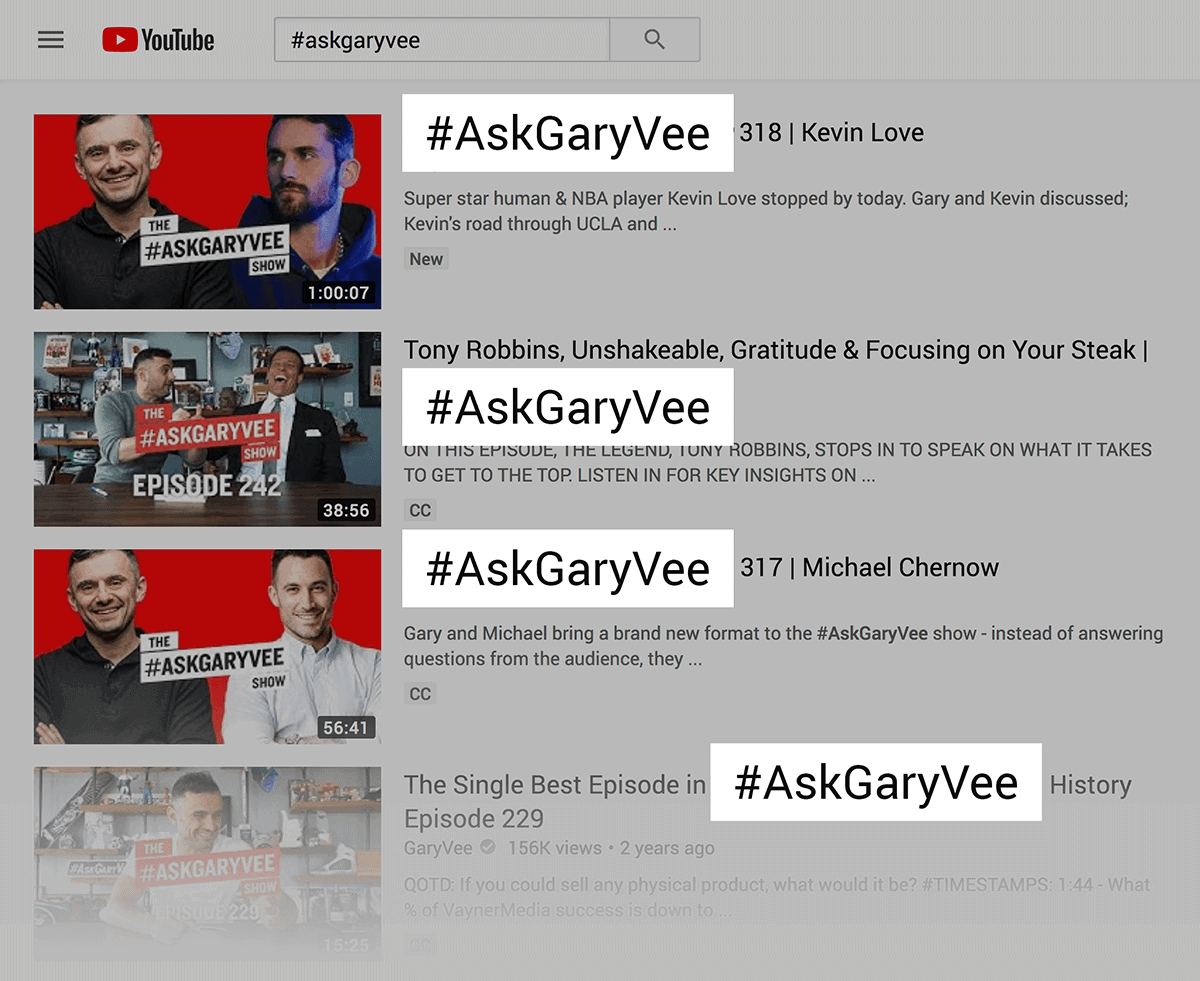
- Hashtags: Visible to viewers above the video title on the watch page and in search results. They are typically shorter, more general terms that act as clickable links, allowing users to discover other videos using the same hashtag.
For example, a video about learning to play the guitar might have tags like “acoustic guitar lessons,” “beginner guitar chords,” “how to strum,” “guitar fingerpicking techniques,” and “easy guitar songs.” For hashtags, you might use #GuitarLessons, #LearnGuitar, or #AcousticGuitar. The hashtags provide a more immediate way for viewers to explore related content.
Impact of Well-Chosen Tags and Hashtags on Reaching a Target Audience
The impact of carefully selected tags and hashtags on reaching your desired audience cannot be overstated. They are direct conduits to connecting with viewers who are genuinely interested in what you have to offer. When your tags and hashtags accurately reflect your video’s content, you attract viewers who are more likely to engage with your video, watch it for longer, and subscribe to your channel.A well-defined target audience means understanding the specific s and phrases they use when searching for information or entertainment related to your niche.
This requires research into popular search terms, competitor analysis, and an understanding of your own content’s unique selling points.For instance, a channel focusing on sustainable living might use tags like “zero waste,” “eco-friendly tips,” “plastic-free living,” “sustainable fashion,” and “DIY eco-friendly products.” The corresponding hashtags could be #SustainableLiving, #ZeroWaste, #EcoFriendly. By using these, the channel can attract viewers who are actively seeking information and solutions for a more sustainable lifestyle, leading to higher engagement and a more dedicated subscriber base.
Conversely, using irrelevant or overly broad tags can lead to your video being shown to uninterested viewers, resulting in low watch time and negative engagement signals for the algorithm.
“The right tags and hashtags are the bridge between your content and the audience actively searching for it.”
Strategic Tagging Techniques
Effectively tagging your YouTube videos is akin to strategically placing signposts for your audience and the YouTube algorithm. It’s about making your content discoverable to the right viewers at the right time. This involves a thoughtful approach to selecting s that accurately represent your video and align with what potential viewers are searching for.The process of identifying and utilizing tags requires understanding different categories of s and how they work together to broaden your video’s reach.
By employing a diverse range of tags, you can significantly increase the chances of your video appearing in search results and recommended videos.
Tag Types to Consider
A comprehensive tagging strategy involves using a variety of tag types to capture different facets of your video’s content and appeal. Each type serves a distinct purpose in enhancing discoverability.Here is a breakdown of essential tag types:
| Tag Type | Description | Example |
|---|---|---|
| Broad Tags | These are general, high-level s that describe the overarching theme or category of your video. They are useful for initial discoverability but can be highly competitive. | “cooking”, “travel”, “fitness”, “technology” |
| Specific Tags | These are more granular s that pinpoint the exact subject matter, niche, or unique aspect of your video. They are crucial for attracting a highly relevant audience. | “vegan pasta recipe”, “budget backpacking europe”, “HIIT workout for beginners”, “smartphone unboxing” |
| Branded Tags | Incorporating your channel name or the name of a specific series you produce helps build brand recognition and makes your content easily searchable for your existing subscribers or those familiar with your brand. | “YourChannelName”, “TechReviewsSeries”, “SarahsBakingAdventures” |
| Competitor Tags | By observing the tags used by successful channels in your niche, you can identify popular and relevant s that resonate with the audience. It’s important to use these ethically and only if they genuinely apply to your content. | “techunboxing”, “gadgetreview”, “best budget phone” (if your video is a review of a budget phone) |
| Long-Tail Tags | These are longer, more specific phrases that often represent a user’s search query more precisely. While they may have lower search volume individually, they can attract highly qualified viewers. | “how to make authentic carbonara pasta recipe”, “tips for solo female travel in Southeast Asia”, “beginner bodyweight exercises for weight loss at home” |
| Audience Intent Tags | Consider the intent behind a search. Are users looking for information, tutorials, reviews, entertainment, or inspiration? Tags reflecting this intent can be very effective. | “learn guitar chords”, “iphone 15 pro review”, “funny cat compilation”, “travel vlog paris” |
Brainstorming Relevant Tags
To brainstorm effective tags, begin by thoroughly analyzing your video’s content. Ask yourself what the video is truly about, what specific topics are covered, and what unique value it offers. Imagine you are a viewer searching for this content; what terms would you use?Next, consider your target audience. What kind of language do they use when searching for information related to your video’s topic?
Understanding their search behavior is paramount. Tools like YouTube’s search bar autocomplete, Google Trends, and dedicated research tools can provide valuable insights into popular search terms and phrases. Look at the tags used by successful videos in your niche to identify common themes and s.
Prioritizing Impactful Tags
Once you have a comprehensive list of potential tags, the next step is to prioritize them based on their potential impact. A good strategy is to use a mix of broad and specific tags to maximize reach and relevance.The process for identifying and prioritizing tags typically involves these steps:
- Initial Brainstorming: Generate a broad list of all possible tags based on video content, audience search terms, and competitor analysis.
- Relevance Check: For each tag, ask yourself: “Does this accurately describe my video?” If not, remove it.
- Search Volume vs. Competition: While not always directly visible on YouTube, general research can give you an idea of search volume. Aim for tags that have a reasonable search volume without being overwhelmingly competitive.
- Specificity Balance: Ensure you have a good balance between broad tags for initial discoverability and specific, long-tail tags to attract a highly targeted audience.
- Prioritize High-Impact Tags: Select a core set of the most relevant and potentially high-performing tags. YouTube allows up to 60 tags, but quality and relevance are more important than quantity. Aim for around 10-20 highly effective tags.
Mixing Broad and Specific Tags
The most effective tagging strategy involves a deliberate combination of broad and specific tags. Broad tags act as a net, catching a wider audience who might be interested in the general topic. Specific tags then refine this reach, ensuring that viewers who click through are genuinely interested in the precise content you offer.For example, if you have a video tutorial on baking a chocolate cake, you might use broad tags like “baking” and “desserts.” These will help people searching for general baking content find your video.
However, to attract those specifically looking for your recipe, you would add specific tags such as “chocolate cake recipe,” “easy chocolate cake,” “fudgy chocolate cake,” and “how to bake a moist cake.”
“A well-crafted tag strategy acts as a bridge between your content and the audience seeking it.”
By using this layered approach, you not only increase the chances of your video being discovered but also ensure that the viewers who find it are more likely to engage with it, leading to better watch time and audience retention. This strategic use of tags is fundamental to maximizing your video’s potential on the platform.
Researching Effective Tags and Hashtags
Discovering the right tags and hashtags is a crucial step in ensuring your YouTube videos reach the intended audience. This section will guide you through proven methods for identifying the most impactful s and phrases to boost your video’s discoverability. By understanding what your audience is searching for and what your competitors are using, you can significantly enhance your video’s performance.
Audience Tag and Hashtag Research
Understanding what your target audience is actively searching for and engaging with is fundamental to effective tagging. By stepping into their shoes, you can uncover the language they use to find content like yours.Here are several methods to research what tags and hashtags your target audience is using:
- Analyze Comments Sections: Carefully read the comments on your own videos and those of similar creators. Look for recurring questions, phrases, and terms that viewers use when discussing the content. This provides direct insight into their search queries and interests.
- Monitor Social Media Discussions: Utilize social media platforms where your target audience congregates. Search for relevant s and hashtags on platforms like Twitter, Reddit, and Instagram. Observe the conversations and the hashtags they employ to categorize and discover content.
- Engage with Your Community: Directly ask your audience what terms they use when searching for videos on your channel’s topics. This can be done through community posts, polls, or by encouraging them to share their search terms in the comments.
- Explore Online Forums and Q&A Sites: Websites like Reddit, Quora, and specialized forums dedicated to your niche are goldmines for understanding user language. Look for frequently asked questions and the terminology used in the discussions.
Competitor Video Tag and Hashtag Analysis
Examining your competitors’ strategies can offer valuable insights into what is working within your niche. By analyzing their tag and hashtag choices, you can identify opportunities and refine your own approach.Techniques for analyzing competitor video tags and hashtags include:
- Direct Observation: For publicly visible tags, simply watch your competitors’ videos and note the tags they are using. While YouTube has made this less accessible, some tools can still assist.
- Browser Extensions: Several browser extensions are available that can display tags used by other YouTube videos directly on the page. These tools can be invaluable for quickly gathering competitor data.
- Third-Party Analytics Tools: Specialized YouTube analytics platforms offer features to analyze competitor channels and their video performance, including tag usage. These tools often provide more in-depth data and competitive insights.
- Manual Search and Comparison: Perform searches on YouTube for s related to your content. Observe the top-ranking videos and analyze the tags and hashtags they employ. Compare their choices with your own to identify gaps or potential improvements.
Utilizing YouTube Search Suggestions
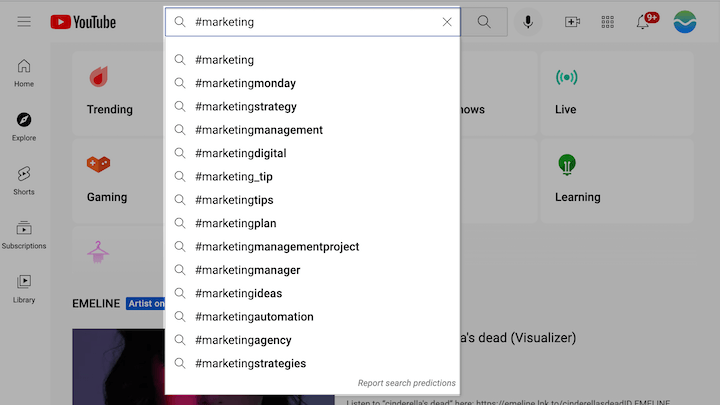
YouTube’s built-in search suggestions are a powerful, free tool for discovering relevant and frequently searched terms. These suggestions are based on actual user searches, making them highly indicative of what people are looking for.Here’s how to effectively utilize YouTube’s search suggestions to find relevant terms:
- Start Typing Your Core s: Begin typing s related to your video topic into the YouTube search bar. As you type, YouTube will automatically suggest related searches.
- Observe Auto-Suggestions: Pay close attention to the phrases and terms that appear in the dropdown menu. These are often long-tail s that users are actively searching for.
- Explore Variations: Try different starting points and variations of your core s to uncover a broader range of suggestions. For instance, if you’re making a video about “baking cookies,” try “how to bake cookies,” “easy cookie recipes,” or “chocolate chip cookie tutorial.”
- Identify Emerging Trends: Notice if certain suggestions are appearing more frequently or seem to be gaining traction. This can indicate trending topics or popular variations of your core subject.
- Consider User Intent: Think about the intent behind each suggestion. Is it informational, navigational, or transactional? This helps you tailor your tags to match what viewers are looking to achieve.
Workflow for Continuous Tag and Hashtag Strategy Updates
The YouTube algorithm and user search behavior are dynamic. To maintain optimal performance, it’s essential to regularly review and update your tag and hashtag strategy.An organized workflow for continuously updating your tag and hashtag strategy based on performance is as follows:
- Initial Research: Begin with thorough research using the methods Artikeld above to build an initial list of relevant tags and hashtags for each new video.
- Implement and Publish: Apply your chosen tags and hashtags to your video during the upload process.
- Performance Monitoring: After publishing, regularly monitor your YouTube Analytics. Key metrics to track include:
- Impressions: How many times your video thumbnail was shown to viewers.
- Click-Through Rate (CTR): The percentage of impressions that resulted in a click.
- Traffic Sources: Specifically, look at “YouTube search” to see which search terms are driving views.
- Audience Retention: While not directly tag-related, high retention suggests your content matches viewer expectations, which tags help set.
- Analyze Search Performance: In YouTube Analytics, navigate to “Traffic sources” > “YouTube search.” This report shows the exact search queries that led viewers to your video. Identify which of your tags are performing well and which are not.
- Identify Underperforming Tags: If a video is not getting the desired views or impressions, examine its tags. Are they too broad, too niche, or irrelevant to the actual content?
- Identify High-Performing Tags: Note the search terms that are successfully bringing viewers to your video. These are your valuable s.
- Refine and Update:
- Add High-Performing Search Terms: Incorporate the successful search terms identified in your analytics as new tags for current and future videos.
- Remove Underperforming Tags: If certain tags consistently fail to drive traffic, consider removing them.
- Adjust Hashtags: Evaluate your hashtags based on their effectiveness in driving discovery and engagement.
- Explore New s: Periodically repeat the research process to discover new trending terms or variations in audience search behavior.
- A/B Testing (Optional but Recommended): For significant videos or if you’re unsure about specific tags, consider a form of A/B testing by slightly altering the tags for a re-upload or a similar video and comparing performance.
- Schedule Regular Reviews: Set a recurring schedule (e.g., monthly or quarterly) to review your overall tagging strategy and make broader adjustments based on accumulated data and YouTube’s evolving landscape.
Integrating Tags and Hashtags into Your Workflow
Seamlessly incorporating tags and hashtags into your YouTube content creation process is key to maximizing visibility and ensuring your videos reach the right audience. This section Artikels practical steps to embed these crucial elements into your regular upload routine, from initial creation to ongoing optimization of your existing library.
By establishing a consistent and efficient workflow, you can transform tag and hashtag management from a chore into a powerful tool for YouTube . This proactive approach ensures that every piece of content you publish has the best possible chance of being discovered.
Step-by-Step Procedure for Adding Tags and Hashtags During Upload
Integrating tags and hashtags effectively begins with a structured approach during the video upload process. Following these steps ensures that you don’t overlook this vital optimization step.
- Access the Details Section: After uploading your video file to YouTube Studio, navigate to the “Details” tab. This is where you’ll find the fields for your video’s title, description, thumbnail, and importantly, tags.
- Input Relevant Tags: In the “Tags” field, begin typing your researched and strategically chosen tags. YouTube will offer suggestions as you type based on popular searches and existing tags. Aim for a mix of broad and specific tags.
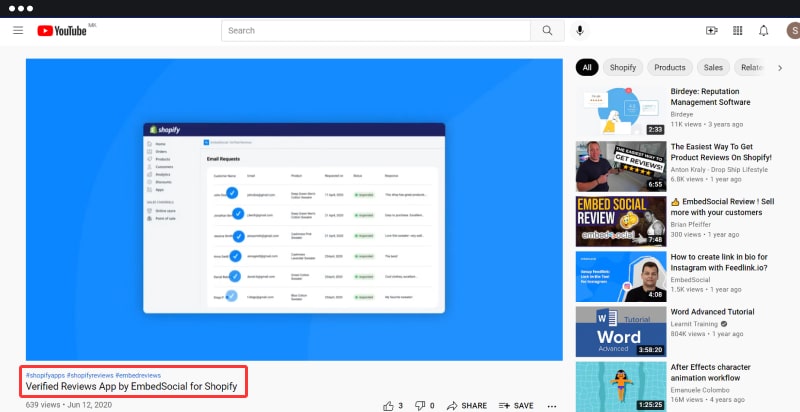
- Utilize Hashtags in Description: While tags are entered in a dedicated field, hashtags are typically placed within your video’s description. It’s a good practice to include 3-5 relevant hashtags at the end of your description. YouTube will also display these hashtags above your video title.
- Review and Refine: Before publishing, take a moment to review the tags and hashtags you’ve added. Ensure they accurately reflect your video’s content and are not misleading.
- Save Your Changes: Once you are satisfied, click the “Save” button to apply your tags and hashtags to the video.
Creating a Saved List of Frequently Used Tags
To streamline the tagging process, especially if you create content within specific niches, maintaining a saved list of frequently used tags can significantly boost efficiency. This prevents repetitive searching and ensures consistency.
You can manage this list using various methods:
- Text Document/Spreadsheet: The simplest approach is to maintain a text document or spreadsheet on your computer. Categorize your tags by video topic or niche. When uploading a new video, copy and paste the relevant tags from your list.
- Browser Extensions: Several browser extensions are designed to help YouTube creators manage their . Some of these extensions allow you to create and save tag lists that can be quickly inserted into the tag field during uploads.
- Note-Taking Apps: Utilize apps like Evernote, OneNote, or Google Keep. Create dedicated notes for your tag lists, making them accessible across devices.
“A well-maintained tag library is a shortcut to consistent and effective YouTube .”
Strategies for Reviewing and Updating Tags and Hashtags on Older Videos
The YouTube algorithm and search trends evolve, making it essential to periodically review and update the tags and hashtags on your older content. This ensures your evergreen videos continue to perform well.
Here are effective strategies:
- Performance Analysis: Regularly check your YouTube Analytics. Identify videos that are underperforming or have seen a decline in views. These are prime candidates for tag and hashtag review.
- Research Refresh: Revisit your research tools to see if new, relevant terms have emerged or if existing terms have gained popularity. Apply these updated s as tags and hashtags to older videos.
- Content Alignment Check: As your channel grows and your content focus may shift, ensure that the tags and hashtags on older videos still accurately reflect the video’s content. Remove irrelevant tags and add new ones if the video’s topic has become more nuanced.
- Competitor Analysis: Observe what tags and hashtags successful competitors are using for similar, older content. This can provide valuable insights for your own optimization efforts.
- Batch Updating: If you have a large library of older videos, consider batch updating them. Group similar videos together and update their tags and hashtags in one session for maximum efficiency.
Organizing Content for a YouTube Checklist
A comprehensive YouTube checklist is an invaluable tool for ensuring all aspects of your video optimization are covered. Tags and hashtags should be a prominent section within this checklist.
Your checklist should include the following for tags and hashtags:
- Research Completed: Confirm that relevant s have been identified for the video’s topic.
- Primary Tags Identified: List the 3-5 most important and specific tags that directly describe the video.
- Secondary Tags Included: Add broader or related tags that expand the potential reach of the video.
- Mix of Broad and Specific Tags: Ensure a balance between general terms and niche-specific phrases.
- Competitor Tag Analysis Done: Verify that you’ve looked at what successful channels are using.
- Hashtags Included in Description: Confirm that 3-5 relevant hashtags are present at the end of the description.
- Tags and Hashtags Align with Content: Double-check that all tags and hashtags accurately represent the video’s subject matter.
- Saved Tag List Updated (if applicable): Ensure your personal tag library is current.
- Older Videos Reviewed for Optimization: Schedule regular reviews of past content.
The Importance of Consistent Tagging Across All Uploaded Content
Consistency in your tagging strategy across all your uploaded content is fundamental for building a cohesive and discoverable channel. It helps YouTube understand your channel’s overall theme and authority.
The benefits of consistent tagging include:
- Improved Channel Authority: When YouTube consistently sees similar tags across your videos, it reinforces your channel’s expertise in those specific areas, leading to better ranking for related searches.
- Enhanced Audience Retention: Consistent tagging helps YouTube recommend your videos to viewers who are already interested in your niche, increasing the likelihood of them watching more of your content.
- Streamlined Content Organization: For both you and YouTube’s algorithm, consistent tagging makes it easier to categorize and understand the relationships between your videos.
- Stronger Brand Identity: Using a consistent set of core tags helps solidify your channel’s brand and niche in the minds of your audience.
- Efficient Workflow Development: As you establish consistent practices, your workflow for tagging becomes more intuitive and less time-consuming.
“Consistency in tagging signals to YouTube that your channel is a reliable source for specific topics, boosting discoverability and audience engagement.”
Closure
In conclusion, mastering the art of using tags and hashtags effectively on YouTube is a dynamic and ongoing process. By diligently applying the strategies discussed, from understanding their fundamental purpose to conducting thorough research and integrating them seamlessly into your workflow, you are well-equipped to enhance your video’s visibility, attract a more targeted viewership, and ultimately achieve greater success on the platform.