Embark on a journey to transform your videos into visually stunning cinematic masterpieces. This comprehensive guide will illuminate the path to achieving that coveted professional look, demystifying the art and science of color grading.
We will explore the fundamental principles that underpin effective color grading, delve into the essential tools and software that empower your creative vision, and meticulously Artikel a workflow designed for seamless execution from start to finish. Furthermore, we will uncover techniques for achieving specific cinematic styles, explore advanced concepts for precise control, and provide practical advice to help you avoid common pitfalls.
Understanding the Fundamentals of Cinematic Color Grading
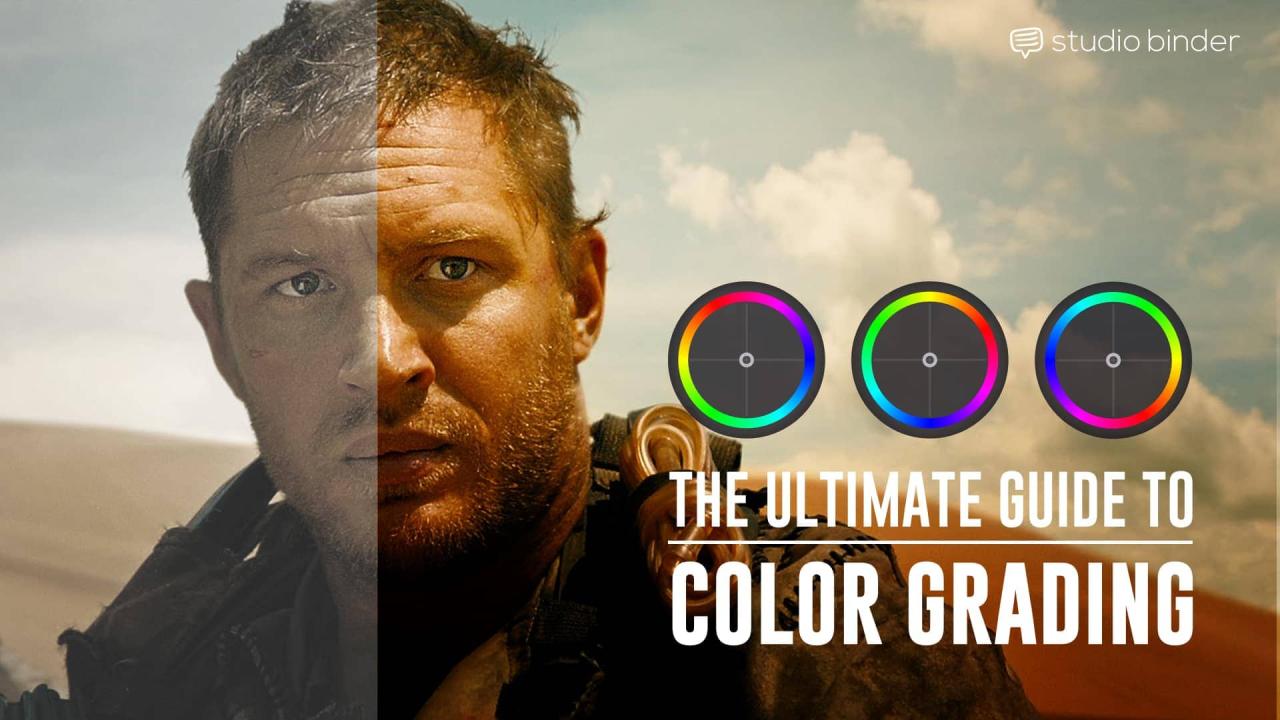
Embarking on the journey to color grade your videos for a cinematic look involves more than just adjusting sliders; it requires a deep understanding of how color influences perception and storytelling. This section lays the groundwork by exploring the core principles that define a filmic aesthetic and how color theory is a powerful tool in achieving it. We will delve into the visual elements that contribute to this look and the psychological effects of color, alongside essential terminology.The fundamental principles of cinematic color grading revolve around establishing a consistent and evocative mood that enhances the narrative.
This is achieved by manipulating hue, saturation, and luminance to guide the viewer’s eye, emphasize key elements, and evoke specific emotions. A cinematic look often involves controlled contrast, subtle transitions between tones, and a deliberate color palette that aligns with the story’s themes and emotional arc.
The Role of Color Theory in Visual Storytelling
Color theory provides a foundational framework for understanding how colors interact and how they can be used to communicate effectively in visual media. In filmmaking, color is not merely decorative; it is a language that speaks directly to the audience’s subconscious, influencing their emotional response and interpretation of the narrative. Understanding these principles allows filmmakers to make intentional choices that amplify the story’s impact.Color theory is essential for visual storytelling because it offers a systematic way to leverage the psychological and symbolic associations of different colors.
For instance, warm colors like reds and oranges can convey passion, energy, or danger, while cool colors such as blues and greens can evoke calmness, sadness, or mystery. By applying these principles, colorists can craft visual narratives that are rich in subtext and emotional resonance, guiding the audience’s feelings and understanding without explicit dialogue.
Key Visual Elements Contributing to a Filmic Aesthetic
Achieving a filmic aesthetic involves more than just color; it’s a holistic approach that includes lighting, composition, and the specific color grading choices. However, color plays a pivotal role in unifying these elements and establishing the overall mood. The key visual elements that contribute to this aesthetic are often characterized by their deliberate and controlled nature, aiming for a polished and immersive viewing experience.The visual elements that contribute to a filmic aesthetic include:
- Contrast and Luminance Curves: Cinematic looks often feature a specific range of contrast, avoiding overly flat or blown-out images. This includes the use of “S-curves” in luminance to create pleasing transitions between highlights, midtones, and shadows, giving images depth and a tangible feel.
- Color Palettes and Harmonies: A deliberate choice of color palettes, often limited to a few dominant hues, creates a cohesive and recognizable look. This can involve complementary colors for dramatic effect, analogous colors for harmony, or monochromatic schemes for a specific mood.
- Skin Tones: Maintaining natural and pleasing skin tones is paramount. Cinematic grading typically ensures that human subjects appear healthy and grounded, even within stylized color schemes. This involves careful manipulation of specific color ranges associated with skin.
- Saturation Levels: Cinematic grading often involves subtle saturation, avoiding overly vibrant or cartoonish colors. The goal is to create a realistic yet enhanced world, where colors feel rich but not overwhelming.
- Halation and Bloom: While not directly color, the subtle glow around bright lights (halation) or the soft diffusion of light (bloom) can contribute to a dreamy, filmic quality that color grading can complement.
Psychological Impact of Different Color Palettes on Audience Perception
Color has a profound and often unconscious effect on human emotions and perceptions. Different color palettes can evoke a wide range of feelings, influence mood, and even shape how an audience interprets a scene or character. Understanding these psychological responses is crucial for using color grading as a narrative tool.The psychological impact of color palettes is well-documented:
- Warm Palettes (Reds, Oranges, Yellows): These colors are often associated with energy, passion, excitement, warmth, and happiness. In a cinematic context, they can be used to create feelings of intensity, urgency, romance, or even anger and danger depending on the specific shade and context. For example, a film set in a vibrant marketplace might utilize warm tones to convey a sense of lively activity and abundance.
- Cool Palettes (Blues, Greens, Purples): These colors tend to evoke feelings of calmness, serenity, sadness, coldness, or mystery. Blues are frequently used in dramas to convey melancholy or in sci-fi films to establish a futuristic or alien environment. Greens can represent nature, health, jealousy, or decay. Purples can suggest royalty, luxury, or the supernatural. A thriller might employ cool, desaturated blues and greens to create a sense of unease and isolation.
- Monochromatic Palettes: Using variations of a single color can create a strong, unified mood. A black and white film, for instance, inherently possesses a timeless, dramatic, or nostalgic quality. A film graded predominantly in shades of sepia might evoke a sense of the past or a vintage feel.
- Complementary Color Palettes: Juxtaposing colors opposite each other on the color wheel (e.g., blue and orange, red and green) creates high contrast and visual excitement. This technique is often used to highlight conflict or tension between characters or elements within a scene. The popular “teal and orange” look, for example, uses the complementary nature of these colors to make skin tones (which often have orange undertones) pop against cool backgrounds.
Common Color Grading Terminology and Their Meanings
Navigating the world of color grading requires familiarity with specific terms that describe the tools, techniques, and desired outcomes. Understanding this vocabulary is essential for effective communication and for accurately implementing the desired aesthetic.Here are some fundamental color grading terms and their meanings:
- Hue: The pure color itself, such as red, green, or blue. It’s the property that distinguishes one color from another.
- Saturation: The intensity or purity of a color. High saturation means the color is vivid and strong, while low saturation results in a more muted or grayish tone.
- Luminance (or Value): The brightness or darkness of a color. This refers to how much light a color reflects or emits.
- Contrast: The difference in luminance or color between the brightest and darkest parts of an image. High contrast means a large difference, while low contrast means a small difference.
- White Balance: The process of adjusting colors so that white objects appear white in the image, regardless of the color temperature of the light source. Incorrect white balance can make an image appear too blue (cool) or too yellow/orange (warm).
- Color Temperature: A measure of the color of light, typically expressed in Kelvin (K). Lower temperatures (e.g., 2000K) are warmer (more red/orange), while higher temperatures (e.g., 10000K) are cooler (more blue).
- Gamma: A non-linear adjustment of midtones. It affects the brightness of the image without significantly impacting the highlights or shadows, contributing to the overall contrast and perceived depth.
- Lift, Gamma, Gain (or Shadows, Midtones, Highlights): These are primary color correction controls.
- Lift: Adjusts the black levels (shadows).
- Gamma: Adjusts the midtones.
- Gain: Adjusts the white levels (highlights).
- Color Wheels: Tools that allow for precise adjustments to specific color ranges (shadows, midtones, highlights) for hue, saturation, and luminance.
- Scopes: Visual representations of the color and luminance information in an image. Common scopes include the waveform monitor (luminance), vectorscope (chrominance/hue and saturation), and histogram (distribution of luminance). They are crucial for objective color correction.
- LUT (Lookup Table): A pre-defined set of instructions that can be applied to an image to alter its colors and contrast, often used to emulate specific film stocks or creative looks.
- Log Footage: A video format that captures a wider dynamic range and more color information than standard formats, providing greater flexibility in post-production color grading.
Essential Tools and Software for Color Grading

To achieve a truly cinematic look in your videos, having the right tools and software is paramount. This section will guide you through the essential elements of a color grading setup, from the software that empowers your creative vision to the hardware that ensures accuracy. Understanding these components will lay a solid foundation for your color grading journey.Color grading is a blend of art and science, and the software you choose plays a crucial role in translating your artistic intent into tangible results.
Fortunately, the landscape of video editing software offers a rich array of options, many of which come equipped with powerful and intuitive color grading capabilities.
Popular Video Editing Software with Robust Color Grading Capabilities
The selection of video editing software available today provides filmmakers and editors with sophisticated tools to manipulate color and achieve specific aesthetics. These platforms are designed to handle complex visual tasks, making them indispensable for professional and aspiring colorists alike.Here’s an overview of some widely recognized software known for their strong color grading features:
- DaVinci Resolve: Often considered the industry standard for color grading, DaVinci Resolve offers an incredibly comprehensive suite of tools, including advanced color correction, grading, and finishing capabilities. Its dedicated “Color” page provides a professional-grade environment for detailed manipulation.
- Adobe Premiere Pro: Integrated within the Adobe Creative Cloud ecosystem, Premiere Pro offers robust color grading tools through its Lumetri Color panel. This panel provides a user-friendly interface with essential controls for basic to intermediate color adjustments, as well as more advanced options for experienced users.
- Final Cut Pro: Apple’s professional video editing software, Final Cut Pro, features an intuitive color board and color wheels that allow for precise control over hue, saturation, and brightness. Its streamlined interface makes it accessible for users familiar with the Apple ecosystem.
- Avid Media Composer: A staple in high-end post-production, Avid Media Composer also includes sophisticated color correction and grading tools, often utilized in large-scale film and television productions.
Essential Color Grading Tools Within Editing Suites
Within these powerful editing suites, specific tools are fundamental for effectively manipulating and analyzing color. Mastering these components will significantly enhance your ability to achieve precise and consistent color grades.The following tools are critical for any color grading workflow:
- Scopes: These are graphical representations of the tonal and color information within your video. They are indispensable for objectively analyzing your footage and ensuring that your color grades are technically sound. Common scopes include:
- Waveform Monitor: Displays the luminance (brightness) levels of your image, helping you to set black and white points and ensure proper exposure.
- Vectorscope: Visualizes the color information (hue and saturation) of your image, allowing you to balance colors and identify any unwanted color casts.
- Histogram: Shows the distribution of pixels across the brightness range of your image, useful for understanding exposure and contrast.
- Curves: Color curves offer a more granular control over the tonal range of your image than simple brightness sliders. You can manipulate specific points on the curve to adjust brightness, contrast, and individual color channels (Red, Green, Blue) for highly detailed adjustments.
- Color Wheels: These intuitive tools allow you to adjust the color and luminance of specific tonal ranges within your image, such as shadows, midtones, and highlights. They are excellent for making broad color shifts and balancing different parts of the image.
- HSL Secondary: This tool allows you to select and adjust specific hues, saturations, and luminance values within your image. This is invaluable for targeted adjustments, such as making a specific color pop or desaturating a particular element.
The Importance of Calibrated Monitors for Accurate Color Work
Achieving accurate color grading is heavily reliant on the display you are using. An uncalibrated monitor can lead to significant discrepancies between what you see on your screen and how your footage will appear on other devices, resulting in inconsistent and inaccurate color grades.A calibrated monitor ensures that the colors displayed are true to life and consistent across different viewing environments.
This involves adjusting the monitor’s settings to meet industry standards for color accuracy, such as sRGB or Rec. 709. Regular calibration is essential, as monitor settings can drift over time. Using a colorimeter or spectrophotometer is the most accurate way to achieve professional-level calibration.
Comparison of Free vs. Professional Color Grading Software
The choice between free and professional color grading software often depends on budget, project scope, and the level of control required. Both have their advantages and disadvantages.Here’s a comparison to help you make an informed decision:
| Feature | Free Software (e.g., DaVinci Resolve Free Version, Shotcut) | Professional Software (e.g., DaVinci Resolve Studio, Adobe Premiere Pro, Final Cut Pro) |
|---|---|---|
| Cost | Free to use, often with limitations on features or export resolution. | Requires purchase, subscription, or one-time license, offering full feature sets. |
| Feature Set | Offers core color grading tools, but may lack advanced features like noise reduction, 3D LUT support, or collaboration tools. | Provides comprehensive and advanced tools, including sophisticated noise reduction, advanced masking, motion tracking, and support for various professional codecs. |
| Performance & Stability | Generally good, but may be less optimized for high-resolution footage or complex projects. | Highly optimized for performance, offering smoother playback and greater stability with demanding workflows. |
| Learning Curve | Can vary, but often designed to be accessible for beginners. | May have a steeper learning curve due to the sheer depth of features, but often come with extensive tutorials and support. |
| Industry Adoption | Increasingly adopted for independent projects and as a learning tool. | Widely used in professional film, television, and commercial production. |
Essential Hardware for a Color Grading Setup
Beyond software, the right hardware is crucial for a smooth and efficient color grading experience. Investing in appropriate hardware can significantly improve your workflow and the quality of your final output.Consider the following essential hardware components for your color grading setup:
- Powerful Computer: A robust CPU, ample RAM (32GB or more recommended for 4K+ workflows), and a dedicated, high-performance GPU are essential for rendering and processing video smoothly, especially with complex color grades and high-resolution footage.
- Fast Storage: Solid-state drives (SSDs) or NVMe drives are highly recommended for your operating system, applications, and project files. This dramatically reduces loading times and improves playback performance.
- Calibrated Monitor: As discussed earlier, a color-accurate monitor is non-negotiable. Look for monitors with good color gamut coverage (e.g., 100% sRGB, 95%+ Adobe RGB or DCI-P3) and consistent brightness and color temperature.
- External Control Surface (Optional but Recommended): Devices like the Tangent Ripple or Blackmagic Design’s panels offer tactile control over color grading parameters, providing a more intuitive and precise way to make adjustments compared to using a mouse.
- Reliable Power Supply and Cooling: Color grading can be resource-intensive. Ensure your computer has adequate cooling to prevent thermal throttling and a stable power supply to avoid interruptions.
The Color Grading Workflow

Embarking on the journey of color grading your videos for a cinematic look requires a structured approach. This workflow ensures that you move systematically from understanding your footage to achieving a polished, consistent, and visually compelling final product. By following these steps, you can transform raw footage into a piece that evokes emotion and tells a story through its color.This section details a comprehensive, step-by-step procedure designed to guide you through the entire color grading process, from the initial assessment of your footage to the final application of a creative look.
We will cover the essential preparation, the fundamental concepts of color correction, and the strategies for maintaining visual harmony across your project.
Initial Footage Assessment and Preparation
Before diving into creative color adjustments, a thorough understanding and preparation of your footage are paramount. This initial phase ensures that you are working with the best possible source material and that your grading process is efficient and effective. It involves reviewing the footage for technical issues, understanding its inherent characteristics, and making any necessary pre-grading adjustments.The following points Artikel the critical steps in assessing and preparing your footage:
- Review Footage: Watch all your clips to identify any exposure issues, white balance problems, or significant noise. Note the general mood and lighting conditions of each shot.
- Technical Evaluation: Check for common technical flaws such as clipped highlights (pure white areas with no detail) or crushed blacks (pure black areas with no detail). Assess the dynamic range of your footage.
- Color Space and Log Footage: If you shot in a flat color profile like Log (e.g., S-Log, V-Log, C-Log), understand that this footage is designed to capture maximum dynamic range and will appear desaturated and low contrast. This is intentional and provides more flexibility during grading.
- Organization: Ensure your footage is well-organized and easy to access within your editing software. Grouping clips by scene or shot type can be beneficial.
- Proxy Creation (Optional but Recommended): For smoother playback and editing, especially with high-resolution footage, consider creating proxy files. These are lower-resolution versions of your original clips that are easier for your system to handle.
Primary and Secondary Color Correction
Color grading is broadly divided into two fundamental stages: primary and secondary color correction. Understanding the distinction and application of each is key to mastering the art of cinematic color. Primary correction sets the foundation for the overall look, while secondary correction allows for targeted adjustments.Primary color correction deals with the overall tonal and color balance of the entire image.
It is the first step in ensuring your footage is technically sound and has a neutral starting point. Secondary color correction, on the other hand, involves isolating and adjusting specific colors or areas within the frame.
Primary Color Correction Explained
Primary color correction focuses on three main aspects: exposure, white balance, and contrast. These adjustments are applied globally to the entire image.The goals of primary color correction are to:
- Adjust Exposure: Ensure that the image is neither too dark nor too bright. This involves lifting shadows, lowering highlights, or adjusting mid-tones to achieve a balanced luminance.
- Correct White Balance: Ensure that whites appear white and grays appear neutral. An incorrect white balance can introduce unwanted color casts (e.g., too blue, too orange).
- Set Contrast: Establish the range between the darkest and brightest parts of the image. This helps in defining the mood and clarity of the scene.
A common approach to primary color correction involves using tools like scopes (waveform, vectorscope, histogram) to objectively assess and adjust these parameters.
Secondary Color Correction Explained
Secondary color correction allows for precise manipulation of specific elements within the frame. This is where you start to introduce creative choices and refine the look of your footage.Key applications of secondary color correction include:
- Hue, Saturation, and Luminance (HSL) Adjustments: This allows you to target a specific color (e.g., blues in the sky) and adjust its hue (the color itself), saturation (intensity), or luminance (brightness).
- Power Windows/Masking: These tools enable you to draw shapes (circles, squares, custom masks) around specific areas of the image (e.g., a person’s face, a specific object) and apply color adjustments only to that isolated region. This is crucial for balancing skin tones or making an object stand out.
- Keying: Similar to masking, keying targets colors (often greens or blues used for green screen) and makes them transparent, allowing for the insertion of a background.
Secondary corrections are vital for refining details, correcting localized issues, and adding artistic flair.
Balancing and Neutralizing Footage
Before applying any creative color grading, it is essential to balance and neutralize your footage. This process aims to remove any inherent color casts or extreme tonal imbalances, providing a clean slate to work from. Think of it as preparing a canvas before painting.The objective here is to achieve a technically correct image that accurately represents the scene’s lighting and colors, free from distracting or unintentional color tints.
This makes subsequent creative grading much more predictable and effective.A methodical approach to balancing and neutralizing involves:
- Neutralizing Color Casts: Use the white balance tools or adjust the color wheels to remove any unwanted color tints. For instance, if your footage has a strong blue cast (making whites look bluish), you would introduce warmth (yellow/red) to counteract it.
- Establishing a Neutral Gray Point: Identify a gray or neutral object in your scene (if available) and use it as a reference to set your white balance accurately.
- Balancing Tones: Ensure that shadows, mid-tones, and highlights are appropriately exposed and do not contain excessive noise or clipped information.
- Using Scopes for Precision: Rely on tools like the waveform monitor to check luminance levels and the vectorscope to assess color saturation and hue. These objective tools help you make precise adjustments without relying solely on your monitor’s appearance.
“A well-balanced image is the foundation upon which all creative grading is built.”
Establishing a Consistent Visual Style
Achieving a consistent visual style across multiple clips is crucial for a professional and cohesive final video. This means ensuring that all shots within a scene or project share a similar color palette, mood, and tonal characteristics, even if they were shot at different times or with different cameras.A systematic approach to establishing consistency ensures that your audience is immersed in the story without being distracted by jarring visual shifts.
This is particularly important for narrative films, documentaries, and any project where a unified aesthetic is desired.Methods for establishing a consistent visual style include:
- Reference Grading: Select a “hero” clip that you have graded to perfection. Then, use this clip as a reference to match the look of other clips. Most color grading software offers tools to compare clips side-by-side or to apply the grade from one clip to another.
- Creating a LUT (Look-Up Table): Once you have achieved a desired look, you can export it as a LUT. A LUT is a file that translates color values, allowing you to quickly apply the same look to multiple clips. Be mindful that LUTs should be applied to footage that has been adequately balanced and neutralized first.
- Using Color Charts: When shooting, incorporate a color chart (like an X-Rite ColorChecker) into your shots. This provides a standardized reference for color and white balance, making it significantly easier to match footage in post-production.
- Shot Matching: Manually adjust each clip to match the overall look of the scene. This involves paying close attention to exposure, white balance, and the dominant color tones.
- Applying a Global Grade: After individual clips are matched, you can apply a subtle global grade to the entire project to unify the look further. This could involve a slight color shift or a specific contrast curve.
Consistency in color grading is not about making every shot identical, but rather about creating a harmonious visual language that supports the narrative and enhances the viewing experience.
Achieving Specific Cinematic Looks
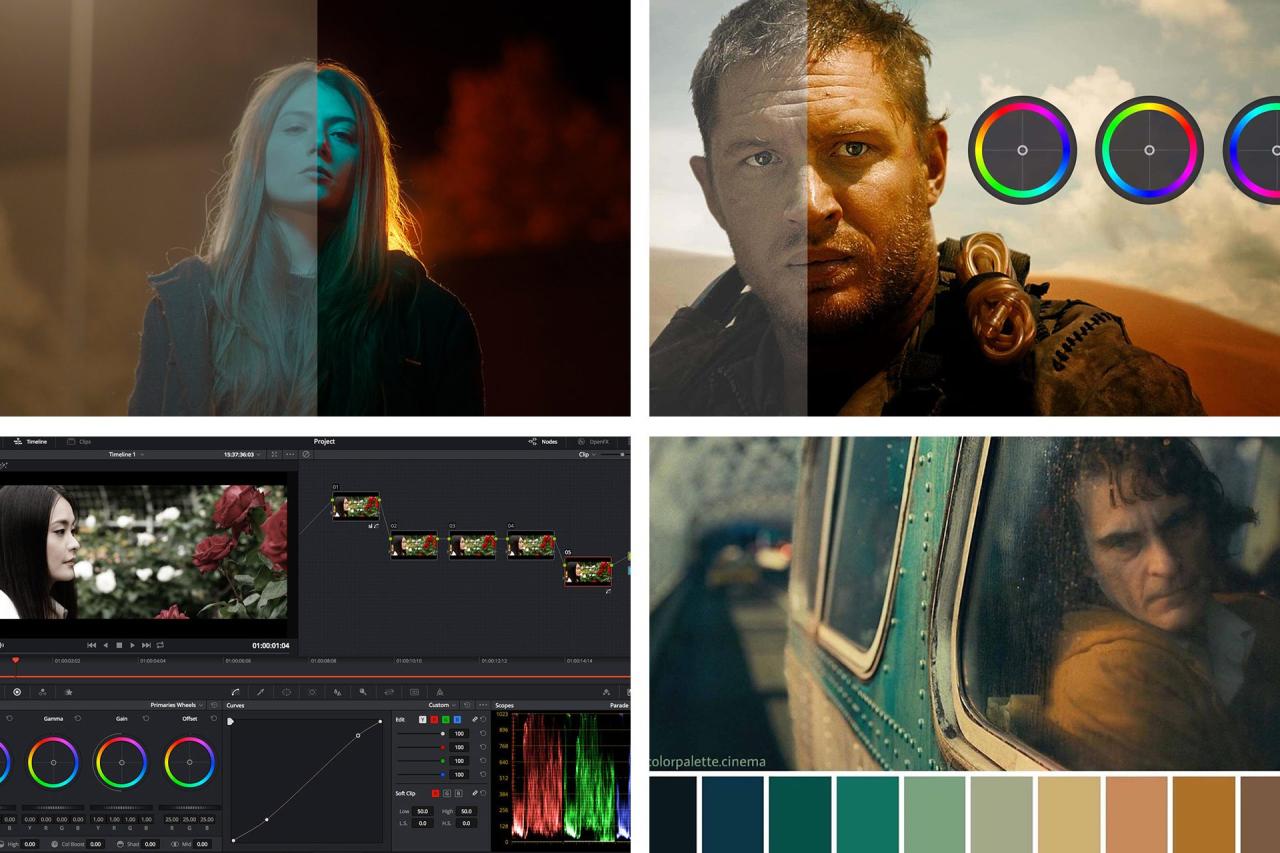
Moving beyond the foundational understanding and tools, the true artistry of color grading lies in developing distinct visual styles that evoke specific emotions and narratives. This section delves into various cinematic aesthetics, offering practical techniques and insights to help you craft unique looks for your videos. We will explore how to achieve popular styles, understand the nuances of film stock emulation, and leverage LUTs and custom presets for efficient and impactful grading.
Advanced Color Grading Concepts and Applications

Beyond the foundational elements, mastering cinematic color grading involves delving into more nuanced techniques that offer precise control and unlock a wider range of creative possibilities. These advanced concepts allow you to sculpt the visual narrative with greater intention, enhancing the emotional impact and overall aesthetic of your videos.This section explores sophisticated methods to refine your color grades, moving from granular adjustments to broad atmospheric creation.
We will examine how these techniques, when applied thoughtfully, can elevate your footage from competent to truly cinematic.
Hue, Saturation, and Luminance (HSL) Adjustments for Precise Control
HSL is a powerful color model that provides granular control over the three fundamental aspects of color: hue, saturation, and luminance. Understanding and utilizing these adjustments is crucial for making specific, targeted changes to your footage without affecting other color ranges.HSL adjustments allow you to isolate and modify specific colors or ranges of colors within your image. This is particularly useful for fine-tuning the look of a particular element, such as making the sky a richer blue or the foliage a more vibrant green, without altering the overall color balance of the scene.
- Hue: This refers to the pure color itself, such as red, green, or blue. Adjusting hue allows you to shift a specific color towards another on the color wheel. For example, you could shift a slightly orange skin tone towards a more peachy hue.
- Saturation: This determines the intensity or purity of a color. Increasing saturation makes a color more vivid, while decreasing it makes it more muted or grayscale. This is vital for controlling the overall vibrancy of your image.
- Luminance: This controls the brightness or lightness of a color. Adjusting luminance allows you to make a specific color darker or lighter independently of its saturation or hue. For instance, you could brighten the highlights of a yellow object without affecting its color or intensity.
Application of Masking and Power Windows in Targeted Grading
Masking and power windows are indispensable tools for applying color grading effects to specific areas of your image, rather than to the entire frame. This targeted approach allows for sophisticated manipulation, enabling you to enhance certain elements or correct inconsistencies without impacting the rest of the scene.These tools are fundamental for achieving a professional and nuanced look, as they permit localized adjustments that mimic how the human eye perceives light and color in the real world.
- Masking: Masks are essentially defined areas within your image to which an effect is applied. They can be created in various shapes and sizes, from simple geometric forms to complex, animated shapes that follow moving objects. This allows for precise isolation of subjects, backgrounds, or specific objects for grading. For example, you might create a mask around a character’s face to subtly adjust their skin tone without affecting the surrounding environment.
- Power Windows: Often synonymous with masks, power windows are typically dynamic masks that can be animated to track objects or areas as they move throughout a shot. This is incredibly useful for scenes with camera movement or subject motion. A common application is to create a power window around a window in a room to subtly brighten the interior light source, adding depth and realism.
Techniques for Skin Tone Correction and Enhancement
Accurate and pleasing skin tones are paramount in creating a cinematic look, as they directly impact the viewer’s connection with characters. Advanced color grading techniques allow for precise correction of skin tones and subtle enhancement to make them appear more natural and appealing.The goal is to achieve a consistent and flattering representation of skin across different lighting conditions and camera setups.
- Identifying Skin Tones: Color scopes, particularly the vectorscope, are invaluable for identifying and analyzing skin tones. Skin tones typically fall within a specific range on the vectorscope, often referred to as the “skin tone line.”
- Primary Adjustments: Initial adjustments using primary color wheels (lift, gamma, gain) can be used to make broad corrections to the overall color cast of the skin. For instance, if skin appears too green, you might add magenta to the midtones (gamma).
- Secondary Adjustments (HSL and Curves): Once primary adjustments are made, HSL sliders or curves can be used for more refined corrections. You might desaturate overly red tones in the skin or adjust the luminance of certain areas to add dimension.
- Qualifier Tools: Advanced software offers qualifier tools that allow you to select specific color ranges (e.g., all reds within a certain luminance and saturation) to isolate and adjust skin tones with exceptional accuracy.
- Look-Up Tables (LUTs) for Skin Tones: While not a standalone solution, certain LUTs are designed to standardize or enhance skin tones, providing a good starting point for further refinement.
Methods for Creating Atmospheric Effects Through Color Grading
Color grading is a powerful tool for establishing mood and atmosphere, transforming a scene’s emotional resonance. By manipulating color palettes, contrast, and saturation, you can evoke specific feelings and transport the viewer into the world of your film.The deliberate use of color can communicate temperature, time of day, emotional states, and the overall genre of your video.
- Cool Tones for Serenity or Melancholy: Blues, cyans, and greens often evoke feelings of calmness, sadness, or a sense of the futuristic or sterile. For example, a nighttime scene might be graded with deep blues to emphasize the darkness and quietude.
- Warm Tones for Energy or Nostalgia: Reds, oranges, and yellows can convey passion, warmth, excitement, or a sense of nostalgia. A golden hour scene might be enhanced with warm tones to amplify its romantic or nostalgic feel.
- Monochromatic or Limited Palettes for Focus or Tension: Reducing the color palette to a few dominant hues can create a strong visual statement. A desaturated, blue-heavy look can create a sense of isolation or unease, while a limited palette of complementary colors can create visual tension.
- Using Fog and Haze Effects: Color grading can simulate atmospheric conditions. Adding a subtle desaturated blue or grey to the shadows can create a sense of fog or mist, enhancing depth and mood.
- Color Contrast for Emphasis: Utilizing complementary colors (colors opposite each other on the color wheel) can create visual pop and draw attention to specific elements. For instance, a character in a red shirt against a blue background will stand out.
Adjusting Contrast and Dynamic Range for a Cinematic Feel
Contrast and dynamic range are fundamental pillars of cinematic image-making. Properly adjusting these elements dictates the visual impact, depth, and perceived realism of your footage, moving it away from a flat, video-like appearance towards a more engaging and filmic quality.Cinematic images often exhibit a wider dynamic range and carefully sculpted contrast curves that guide the viewer’s eye and enhance the storytelling.
- Understanding Dynamic Range: Dynamic range refers to the ratio between the brightest and darkest parts of an image that can be captured or displayed. Footage with a wider dynamic range retains more detail in both highlights and shadows.
- The “S-Curve” for Contrast: A classic technique for enhancing contrast is the “S-curve” applied in the tone curve. This involves slightly lifting the blacks (making them less black) and slightly lowering the whites (making them less white) in the shadows and highlights respectively, while increasing contrast in the midtones. This creates a pleasing separation between tones and adds depth.
- Crushing Blacks vs. Lifted Blacks: “Crushing blacks” refers to making the darkest parts of the image pure black, eliminating detail. This can be used for stylistic effect to increase drama or hide details. Conversely, “lifted blacks” involves subtly raising the black point, giving the image a slightly faded or vintage look, and retaining shadow detail.
- Highlight Roll-off: Cinematic images often feature a smooth transition from bright areas to pure white, known as highlight roll-off. This prevents harsh, blown-out highlights and contributes to a more organic and filmic appearance. This is often achieved by carefully adjusting the highlight controls or using tone curves.
- Adding Grain: While not strictly a contrast adjustment, the addition of film grain can significantly contribute to a cinematic feel by mimicking the texture of traditional film stock and helping to mask minor imperfections in dynamic range.
The S-curve is a cornerstone of cinematic contrast, providing visual punch without crushing details.
Impact of Different Color Grading Approaches on Mood and Genre
The choices made during color grading have a profound impact on the perceived mood and genre of a video. Different color palettes, contrast levels, and saturation choices can dramatically alter how an audience interprets the emotional tone and narrative context of a scene.Understanding these relationships allows filmmakers to strategically employ color grading to reinforce their storytelling intentions.
| Genre/Mood | Typical Color Grading Approach | Impact on Viewer |
|---|---|---|
| Action/Thriller | High contrast, desaturated or cool color palettes (blues, greys), sometimes with selective pops of color (e.g., red for danger). Deep shadows and bright highlights. | Creates tension, urgency, a sense of grit, and heightened drama. |
| Sci-Fi/Futuristic | Often utilizes cool, often artificial-looking blues, cyans, and greens. Can feature high contrast and a sterile, sometimes metallic sheen. | Evokes a sense of the unknown, advanced technology, coldness, or alienation. |
| Romance/Drama | Softer contrast, warmer tones (golds, oranges, soft reds), or a more naturalistic palette. Emphasis on pleasing skin tones and a sense of intimacy. | Fosters feelings of warmth, connection, emotion, and a more grounded, human experience. |
| Horror | Often employs dark, desaturated palettes with high contrast. Deep blacks, muted colors, and sometimes stark, unnatural color shifts to create unease. | Generates fear, dread, suspense, and a sense of the uncanny. |
| Comedy | Typically bright, saturated colors, higher luminance, and often a more natural or slightly exaggerated color palette. | Contributes to a lighthearted, cheerful, and energetic atmosphere. |
| Western/Period Drama | Often uses muted, earthy tones (browns, ochres, desaturated greens) to evoke a sense of realism and historical authenticity. Can feature a slightly warmer or cooler overall cast depending on the specific era. | Grounds the viewer in the time period, creating a sense of realism and often a nostalgic or gritty feel. |
Practical Tips and Common Pitfalls to Avoid
Embarking on the journey of cinematic color grading can be incredibly rewarding, but like any craft, it comes with its own set of challenges and potential missteps. This section is dedicated to equipping you with practical advice to navigate these common pitfalls and refine your approach for consistently stunning results. By understanding where others often stumble, you can proactively steer clear of these issues and accelerate your progress towards achieving that coveted cinematic look.
Common Mistakes in Cinematic Color Grading
Beginners often fall into predictable traps when first exploring cinematic color grading. Recognizing these common errors is the first step to avoiding them. These mistakes can range from technical oversights to aesthetic misjudgments, all of which can detract from the intended cinematic feel of your footage.
- Over-Saturation: Pushing colors too far can make footage look artificial and garish, losing the subtle nuances that define a cinematic palette.
- Incorrect White Balance: Failing to establish a neutral starting point for white balance leads to color casts that are difficult to correct later and appear unnatural.
- Ignoring Skin Tones: Skin tones are crucial for audience connection. Mishandling them, such as making them too green, blue, or overly desaturated, can be highly distracting.
- Excessive Contrast: While cinematic looks often involve increased contrast, pushing it too far can crush details in shadows or blow out highlights, creating a harsh image.
- Inconsistent Grading: Applying drastically different looks to shots within the same scene breaks immersion and looks unprofessional.
- Ignoring the Source Material: Trying to force a specific look onto footage that wasn’t shot with that intention can yield poor results. Understanding the limitations and strengths of your footage is key.
Maintaining Color Consistency and Continuity
Consistency is paramount for a professional and immersive viewing experience. When color grading, ensuring that each shot flows seamlessly into the next is as important as the look itself. This involves meticulous attention to detail across your entire project, from the first shot to the last.
- Use Scopes Religiously: Waveforms, vectorscopes, and histograms are your best friends for objective analysis. They provide visual feedback on luminance, saturation, and hue, helping you match shots precisely.
- Establish a Primary Grade: Before diving into secondary corrections or creative looks, ensure your footage is balanced in terms of exposure, contrast, and white balance. This provides a solid foundation for all subsequent grading.
- Utilize LUTs (with caution): While LUTs can be a great starting point, they are not a magic bullet. Always adjust and refine the output of a LUT to match your specific footage and desired look.
- Reference Shots: If possible, identify a “hero shot” within your project that perfectly encapsulates your desired look and use it as a constant reference point when grading other shots.
- Shot Matching Tools: Many software packages offer shot-matching features that analyze and attempt to replicate the color and luminance characteristics of a reference clip.
- Render and Review: Periodically render out short sequences or even the entire project to watch on a calibrated display. This is often when subtle inconsistencies become apparent.
The Importance of Not Over-Grading Footage
The allure of dramatically altering footage can be strong, especially when exploring new creative possibilities. However, over-grading is a common pitfall that can quickly turn a potentially cinematic image into something artificial and unappealing. The goal is to enhance, not to overpower.
Over-grading often manifests as excessive saturation, unnatural color shifts, or an overly stylized contrast that detracts from the story. It can make footage look like a video game or a poorly executed music video, losing the organic feel that characterizes great cinema. The most effective cinematic color grading often appears subtle, almost invisible, working in harmony with the cinematography and performance to evoke emotion and enhance the narrative.
“Subtlety is key. The audience should feel the mood, not see the grade.”
Instead of pushing sliders to their extremes, focus on making small, incremental adjustments. The aim is to bring out the best in your footage, correcting flaws and enhancing its inherent qualities, rather than imposing an entirely new reality that feels disconnected from the original recording.
Strategies for Color Grading in Different Lighting Conditions
Every lighting scenario presents unique challenges and opportunities for color grading. Adapting your approach based on the available light is crucial for achieving a consistent and cinematic look across diverse shooting environments. Understanding the characteristics of different lighting will allow you to make informed decisions.
Daylight and Natural Light
Daylight, especially direct sunlight, can be harsh and create strong contrasts. When grading daylight footage, focus on softening highlights, bringing detail back into the shadows, and ensuring natural-looking skin tones. Often, a slightly cooler or warmer tint can be applied to evoke a specific mood, such as a warm, golden hour glow or a crisp, cool daytime feel. The challenge here is often taming the intensity of the sun while preserving natural detail.
Artificial Lighting (Tungsten, Fluorescent, LED)
Artificial lights introduce their own color casts. Tungsten lights are typically warm and orange, while fluorescent lights can have a green or magenta cast. LEDs offer more control but can still vary in their color temperature. Your primary task here is to neutralize these casts and establish a consistent white balance. Once neutralized, you can then creatively push the colors to achieve your desired look.
For instance, you might lean into the warmth of tungsten for a cozy interior or use a cooler tone for a sterile, modern environment.
Low Light and Mixed Lighting
Low light footage often comes with increased noise and reduced dynamic range. Grading in these conditions requires a delicate balance to avoid amplifying noise or crushing the remaining detail. Focus on lifting shadows carefully and potentially desaturating areas where noise is most prominent. Mixed lighting, where different light sources with varying color temperatures are present, is one of the most challenging scenarios.
Here, you’ll likely need to employ more advanced techniques like selective color correction or power windows to address different areas of the frame independently.
Effectively Using Reference Images for Inspiration
Reference images are invaluable tools for defining and achieving a specific cinematic look. They provide a tangible target and help communicate your vision to others. However, simply mimicking an image without understanding its underlying principles can lead to disappointing results.
- Identify the Core Elements: Don’t just look at the overall color. Analyze the contrast, saturation levels, the treatment of highlights and shadows, and the specific hues used. Is the green desaturated? Is the blue in the shadows pronounced?
- Analyze the Mood and Emotion: Consider what the colors and tones of the reference image evoke. Is it warm and inviting, cold and sterile, dramatic and intense? Connect the visual elements to the emotional impact.
- Break Down the Look: Try to deconstruct the reference image into its constituent parts. What is the primary color palette? Are there secondary colors that complement or contrast? How is skin tone treated?
- Use Multiple References: Relying on a single reference can be limiting. Gather a few images that capture different aspects of the look you’re aiming for, whether it’s the lighting of one, the color palette of another, and the contrast of a third.
- Apply, Don’t Replicate: Understand that your footage is unique. The goal is to be inspired by the reference, not to perfectly replicate it. Adapt the principles of the reference to your own material.
- Show, Don’t Just Tell: When discussing your vision with collaborators, use your reference images to illustrate your points. This visual communication is far more effective than words alone.
Checklist of Best Practices for Cinematic Color Grading
To solidify your understanding and ensure you’re on the right track, this checklist Artikels key best practices for achieving a cinematic color grade. Refer to this list regularly as you work through your projects.
- Shoot with the End in Mind: Understand your camera’s capabilities and limitations. Shoot in a color space that offers maximum flexibility (e.g., Log profiles).
- Calibrate Your Monitor: Ensure your display accurately represents colors and luminance levels. An uncalibrated monitor is a recipe for inconsistent results.
- Start with a Neutral Base: Correct exposure, white balance, and basic contrast before applying creative looks.
- Use Scopes for Objective Analysis: Rely on waveforms, vectorscopes, and histograms to guide your decisions, not just your eyes.
- Prioritize Skin Tones: Ensure skin tones are natural and pleasing across all shots.
- Maintain Consistency: Match shots within scenes meticulously for a seamless viewing experience.
- Avoid Over-Grading: Strive for subtlety and enhancement rather than drastic, artificial alterations.
- Understand Your Lighting: Adapt your grading approach to the specific lighting conditions of your footage.
- Leverage Reference Images Wisely: Use them for inspiration and analysis, not as rigid templates.
- Render and Review Frequently: Watch your graded footage on a calibrated display to catch subtle errors.
- Consider the Narrative: Ensure your color grade serves the story and enhances the emotional impact.
- Learn Keyboard Shortcuts: Efficiency is key, especially when grading longer projects.
- Save Versions: Keep backups of your grades at different stages so you can revert if necessary.
Closure
By mastering the techniques discussed, you will be well-equipped to elevate your video content, imbuing it with the depth, emotion, and professional polish that defines cinematic storytelling. Embrace the power of color to captivate your audience and leave a lasting visual impression.