Embark on a journey to demystify the creation of captivating animated explainer videos. This guide will illuminate the path from conceptualization to final render, transforming complex ideas into easily digestible visual narratives. Prepare to unlock the power of animation to effectively communicate your message and engage your audience like never before.
We will delve into the fundamental purpose and benefits of these dynamic videos, exploring the typical elements that comprise them and the common objectives they help businesses and individuals achieve. From meticulous planning and scriptwriting to selecting the perfect tools and crafting compelling visuals, every step will be laid out to ensure your success.
Understanding the Core Concept of Explainer Videos
Animated explainer videos serve as a powerful and engaging medium to simplify complex ideas, products, or services. They are designed to capture attention, convey information efficiently, and drive a desired action from the viewer. In today’s fast-paced digital landscape, where attention spans are short, a well-crafted explainer video can cut through the noise and deliver your message effectively. The primary goal is to educate, persuade, and ultimately, convert.These videos excel at breaking down intricate subjects into easily digestible visual narratives.
Whether you’re launching a new app, explaining a service, or illustrating a scientific concept, an explainer video can make the abstract tangible and the complicated clear. Their inherent visual nature makes them more memorable and shareable than traditional text-based content, fostering a deeper connection with the audience and increasing the likelihood of message retention and engagement.
The Fundamental Purpose and Benefits of Explainer Videos
The core purpose of an animated explainer video is to communicate a specific message in a clear, concise, and engaging manner. They are particularly effective for introducing a product or service, demonstrating how something works, or educating an audience on a particular topic. The benefits are manifold, ranging from increased conversion rates and improved brand recall to enhanced customer understanding and reduced support queries.
By simplifying complex information, explainer videos make your offerings more accessible and appealing to a wider audience, thereby driving engagement and fostering trust.
Typical Elements of a Simple Animated Explainer Video
A simple animated explainer video, while varied in style, generally comprises a few key components that work in harmony to deliver a compelling narrative. These elements are carefully orchestrated to guide the viewer through the information logically and engagingly.
- Engaging Visuals: This includes character animation, motion graphics, and iconography that visually represent the concepts being discussed. The animation style is crucial in setting the tone and brand identity.
- Clear Narration: A professional voice-over that guides the viewer through the video, explaining the key points in a friendly and authoritative tone. The script is typically concise and easy to understand.
- Concise Script: A well-written script that is focused, benefit-driven, and tailored to the target audience. It should avoid jargon and present information in a logical flow.
- Background Music and Sound Effects: These elements enhance the emotional impact of the video, keeping the viewer engaged and reinforcing the message.
- Call to Action: A clear directive at the end of the video, prompting the viewer to take a specific next step, such as visiting a website, signing up for a trial, or making a purchase.
Common Objectives Achieved with Explainer Videos
Businesses and individuals leverage animated explainer videos to achieve a diverse set of strategic goals. These objectives are typically aligned with marketing, sales, and educational initiatives, aiming to improve communication effectiveness and drive tangible results.
| Objective | Description | Example |
|---|---|---|
| Product/Service Introduction | To introduce a new offering to the market, highlighting its features and benefits. | A startup uses an explainer video to showcase its innovative mobile app for task management, demonstrating its user-friendly interface and productivity-boosting features to potential users. |
| Customer Education | To explain how a product or service works, or to educate customers on a specific process or concept. | A software company creates a video to guide new users through the onboarding process of their complex CRM system, ensuring they can utilize its full potential from the outset. |
| Lead Generation | To capture the interest of potential customers and encourage them to take the next step, such as downloading a resource or requesting a demo. | An e-commerce platform features a short explainer video on its homepage that quickly Artikels the benefits of its subscription box service, prompting viewers to sign up for their first box. |
| Brand Awareness | To increase recognition and recall of a brand by sharing its story, mission, or values in an engaging format. | A non-profit organization produces an animated video detailing the impact of their work and how donations are used, aiming to connect with a broader audience and build support for their cause. |
| Website Conversion | To persuade website visitors to complete a desired action, such as making a purchase or filling out a contact form. | An online course provider embeds an explainer video on its sales page that breaks down the curriculum and learning outcomes, encouraging prospective students to enroll in the course. |
Planning Your Explainer Video
Before diving into the animation and voiceover, a solid plan is crucial for creating an effective and engaging explainer video. This phase, known as pre-production, lays the groundwork for a smooth and successful production process, ensuring your message resonates with your intended audience.Effective planning involves several key steps that, when followed diligently, significantly increase the likelihood of your video achieving its objectives.
It’s about clarity of purpose, audience understanding, and visualizing the narrative before any creative assets are produced.
Essential Pre-Production Steps
Organizing the pre-production phase ensures that all critical elements are considered and prepared before moving into the more visually intensive stages of production. This structured approach minimizes potential roadblocks and allows for a more efficient workflow.The following steps are fundamental to a well-executed explainer video project:
- Define Your Goal: Clearly articulate what you want the video to achieve. Is it to drive sales, explain a complex concept, onboard new users, or build brand awareness? A well-defined goal guides all subsequent decisions.
- Identify Your Target Audience: Understand who you are trying to reach. Consider their demographics, pain points, existing knowledge, and preferred communication styles. This insight is vital for tailoring your message and tone.
- Determine Key Message(s): What are the one or two most important takeaways you want your audience to remember? Keep it focused and avoid overwhelming them with too much information.
- Artikel the Video Structure: Plan the flow of your video. A common structure includes an introduction to the problem, the solution your product/service offers, and a clear call to action.
- Allocate Budget and Resources: Determine your budget for scriptwriting, voiceover, animation, and any other necessary elements. Identify the team members or external resources you will need.
- Set a Timeline: Establish realistic deadlines for each stage of the pre-production and production process.
Scriptwriting Process for Clarity and Conciseness
The script is the backbone of your explainer video. It needs to be clear, concise, and compelling, guiding the viewer through your message logically and engagingly. A well-written script ensures that your animation and voiceover work in harmony to deliver your intended message effectively.A systematic approach to scriptwriting helps in achieving clarity and conciseness:
- Brainstorm Core Ideas: Start by jotting down all the key points you want to cover. Don’t worry about structure or wording at this stage; focus on content.
- Define the Problem: Clearly articulate the pain point or challenge your target audience faces. This sets the stage and makes your solution more relevant.
- Introduce the Solution: Present your product or service as the ideal solution to the identified problem. Highlight its key benefits and unique selling propositions.
- Explain How it Works: Briefly and clearly explain the mechanism or process of your solution. Use simple language and avoid jargon.
- Provide Proof or Social Validation: If applicable, include testimonials, statistics, or case studies to build credibility and trust.
- Craft a Strong Call to Action (CTA): Tell your audience exactly what you want them to do next, whether it’s visiting a website, signing up for a trial, or making a purchase.
- Refine and Edit for Conciseness: Read the script aloud to identify awkward phrasing or areas that can be shortened. Aim for a word count that aligns with your desired video length (typically 60-90 seconds for explainer videos).
- Incorporate Visual Cues: As you write, think about what visuals will accompany your words. Note down ideas for animations, graphics, or on-screen text.
A good rule of thumb is that each spoken sentence should ideally correspond to a distinct visual element or action on screen, enhancing comprehension and engagement.
Target Audience Definition and Message Tailoring
Understanding your target audience is paramount to creating an explainer video that resonates and achieves its objectives. A message that speaks directly to the needs, interests, and language of your audience will be far more effective than a generic one.Tailoring your message involves several considerations:
- Demographic Analysis: Consider age, location, profession, and income level. For example, a video aimed at tech-savvy millennials might use different language and visuals than one for retirees.
- Psychographic Profiling: Understand your audience’s values, attitudes, interests, and lifestyles. This helps in crafting a message that aligns with their worldview and aspirations.
- Pain Point Identification: What are the specific problems or frustrations your audience experiences that your product or service can solve? Your message should directly address these.
- Level of Familiarity: Gauge how much your audience already knows about your industry, product category, or the problem you are addressing. Adjust the complexity of your explanation accordingly.
- Tone and Language: Use language and a tone that your audience will find relatable and trustworthy. This could range from formal and professional to casual and friendly, depending on your audience and brand.
- Cultural Nuances: Be mindful of cultural differences if your audience is global, ensuring your message is sensitive and appropriate across different regions.
For instance, if your target audience is small business owners struggling with time management, your explainer video should focus on how your service saves them time and reduces stress, using practical examples they can relate to.
The Importance of Storyboarding for Visualizing the Narrative
Storyboarding is a critical pre-production step that translates your script into a visual blueprint for your explainer video. It involves creating a sequence of drawings or images that depict the key scenes and actions, along with accompanying notes for dialogue, sound effects, and camera angles. This visual representation is invaluable for planning the animation and ensuring a cohesive narrative flow.The role of storyboarding in visualizing the narrative is multifaceted:
- Visual Planning: It allows you to see how your script will look on screen, helping to identify potential visual challenges or opportunities early on.
- Narrative Flow: Storyboards help ensure that the story progresses logically and smoothly from one scene to the next, maintaining viewer engagement.
- Communication Tool: It serves as a clear communication tool for your animation team, voiceover artist, and other stakeholders, ensuring everyone is on the same page regarding the visual direction.
- Efficiency: By visualizing the video before animation begins, storyboarding helps to prevent costly revisions and delays during the production phase.
- Pacing and Timing: You can use the storyboard to roughly estimate the timing of each scene, ensuring the overall video length is within your target.
- Character and Scene Design: It aids in the conceptualization of characters, backgrounds, and key visual elements that will define the aesthetic of your explainer video.
A storyboard typically consists of a series of panels, each representing a shot or scene. Within each panel, you would find a sketch of the visual action, a brief description of what is happening, and any relevant dialogue or sound cues. For example, a panel might show a frustrated business owner looking at a pile of paperwork, with a note indicating the voiceover line: “Are you drowning in administrative tasks?” This visual guide is essential for bringing your script to life.
Choosing the Right Tools and Software
With your concept and plan in place, the next crucial step is selecting the right tools and software to bring your explainer video to life. Fortunately, there’s a wide array of options available, catering to different skill levels and budgets. Making informed choices here will significantly impact the ease of creation and the final quality of your video.
User-Friendly Animation Software for Beginners
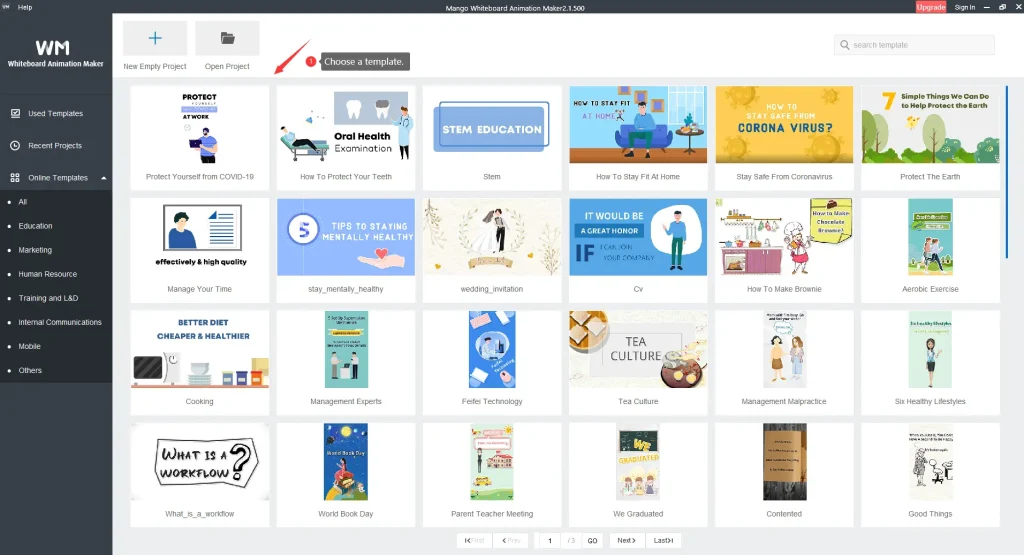
For those new to animation, user-friendly software can make a significant difference in the learning curve and overall experience. These platforms are designed with intuitive interfaces and often provide pre-built assets and templates to streamline the creation process.Here are some popular and accessible options:
- Vyond (formerly GoAnimate): This cloud-based platform is renowned for its ease of use, offering a drag-and-drop interface, a vast library of characters, props, and backgrounds, and various animation styles. It’s excellent for creating business-oriented explainer videos quickly.
- Animaker: Similar to Vyond, Animaker is a web-based tool that empowers users to create professional-looking animated videos without prior experience. It boasts a large asset library and allows for a good degree of customization.
- Powtoon: Powtoon is another online tool that simplifies explainer video creation. It offers a variety of templates, characters, and styles, making it easy to produce engaging animated content for marketing, education, or presentations.
- Biteable: While also offering live-action and mixed media options, Biteable has robust animation features. It provides a good selection of templates and an intuitive editor, making it a solid choice for beginners looking for quick results.
- Canva: Beyond its graphic design capabilities, Canva has introduced video editing and animation features. Its drag-and-drop interface and extensive library of elements make it surprisingly capable for creating simple animated explainer videos, especially for social media.
Common Animation Styles in Explainer Videos
The visual style of your explainer video plays a vital role in how your message is received. Different animation styles evoke different feelings and are suited for different types of content. Understanding these styles will help you choose the one that best aligns with your brand and message.Consider these popular styles:
- Whiteboard Animation: This style mimics a hand drawing on a whiteboard, making it highly engaging and effective for explaining complex concepts in a clear, step-by-step manner. The focus is on the unfolding of information.
- 2D Character Animation: This involves creating animated characters that move and interact within a 2D environment. It’s excellent for storytelling, building emotional connections, and illustrating processes or scenarios involving people.
- Motion Graphics: This style focuses on animating text, shapes, icons, and other graphic elements. It’s ideal for conveying data, statistics, or abstract concepts in a visually dynamic and modern way, often used for product features or service benefits.
- Typographic Animation: This style primarily uses animated text to convey information. It can be very impactful for highlighting key messages, statistics, or calls to action, often combined with simple graphic elements.
- Isometric Animation: This style uses isometric projection to create a 3D-like appearance in a 2D space, giving visuals depth and a sense of dimension. It’s often used for showcasing products, interfaces, or architectural concepts.
Royalty-Free Music and Sound Effects Resources
Audio plays a crucial role in enhancing the engagement and professionalism of your explainer video. Fortunately, numerous platforms offer high-quality, royalty-free music and sound effects, allowing you to use them without worrying about copyright infringement.Here are some excellent resources to explore:
- Epidemic Sound: Offers a vast library of high-quality music and sound effects with a subscription model, providing unlimited access.
- Artlist: Another subscription-based service known for its curated selection of cinematic and high-quality music tracks suitable for professional productions.
- Soundstripe: Provides a good selection of royalty-free music and sound effects, with subscription plans that offer access to their entire library.
- Pixabay Music: A great free resource offering a decent selection of music tracks and sound effects that can be used commercially without attribution.
- Freesound.org: A collaborative database of Creative Commons licensed sounds, offering a wide variety of sound effects, though attribution may be required for some licenses.
- YouTube Audio Library: Directly accessible within YouTube Studio, this library provides a good collection of free music and sound effects that can be used in your videos.
The Role of Voiceovers and Options for Obtaining Them
A compelling voiceover is often the backbone of an explainer video, guiding the audience through the narrative and conveying information clearly and engagingly. The tone, clarity, and delivery of the voiceover can significantly impact how your message is perceived.You have several options for obtaining voiceovers:
- Professional Voiceover Artists: Hiring a professional voiceover artist ensures high-quality delivery, excellent diction, and a polished sound. This is often the preferred choice for businesses aiming for a premium feel. Platforms like Fiverr, Upwork, and dedicated voiceover agencies connect you with professionals.
- AI Voice Generators: With advancements in AI, text-to-speech technology has become remarkably sophisticated. Services like Murf.ai, Speechelo, and Google Text-to-Speech offer a range of voices and languages that can produce natural-sounding voiceovers. This is a cost-effective and quick option for many projects.
- DIY Voiceovers: If you have a clear speaking voice and a quiet recording environment, you can record your own voiceover. This requires a decent microphone and basic audio editing skills. While it can be budget-friendly, ensuring consistent quality and professional delivery is key.
- Using Your Own Team: For internal projects or when a specific brand voice is desired, a team member with good speaking abilities can be tasked with recording the voiceover.
When selecting a voiceover, consider the target audience, the tone of your video, and the overall brand identity. A voice that resonates with your audience will enhance the effectiveness of your explainer video.
Creating Visual Assets

This section focuses on the crucial step of bringing your explainer video to life visually. Developing a cohesive and appealing aesthetic is paramount to capturing and retaining your audience’s attention while effectively communicating your message. A strong visual identity reinforces your brand and makes your video memorable.The process of creating visual assets involves a thoughtful approach to every element, from the overarching style to the smallest details.
This ensures that your explainer video is not only informative but also visually engaging and professional.
Developing a Consistent Visual Style and Branding
Establishing a consistent visual style is fundamental to creating a professional and memorable explainer video. This involves defining a palette of colors, a set of typography, and an overall aesthetic that aligns with your brand identity. This consistency helps in building brand recognition and trust with your audience.Key elements to consider when developing your visual style include:
- Color Palette: Select a primary and secondary set of colors that reflect your brand’s personality. For example, a tech company might use blues and grays for a professional feel, while a children’s toy company might opt for bright, vibrant colors.
- Typography: Choose one or two font families that are legible and align with your brand’s tone. A serif font can convey tradition and authority, while a sans-serif font often appears modern and clean.
- Iconography and Illustration Style: Decide on a consistent style for any icons or illustrations used. This could range from flat design with sharp edges to more organic, hand-drawn aesthetics.
- Overall Mood: Determine the emotional tone of your video. Is it serious and informative, or lighthearted and playful? This will influence all visual choices.
Designing or Selecting Characters and Props
Characters and props are the tangible elements that bring your narrative to life and help viewers connect with the concepts being explained. Whether you choose to design custom characters or select from existing libraries, their design should complement your overall visual style.The process for characters and props can be approached in several ways:
- Custom Design: This offers the most control over brand alignment. When designing characters, consider their expressions, body language, and attire to effectively convey emotions and actions. For props, ensure they are recognizable and relevant to the topic being explained. For instance, if explaining a financial concept, relevant props might include coins, charts, or a calculator.
- Stock Asset Libraries: Numerous platforms offer pre-designed characters and props. When selecting these, prioritize assets that match your established visual style in terms of color, line weight, and overall aesthetic. It’s often beneficial to use assets from a single provider or a curated collection to maintain consistency.
- Character Archetypes: Consider using common character archetypes that your audience will readily understand, such as a friendly guide, a curious learner, or an expert.
Creating Engaging Backgrounds and Scene Elements
Backgrounds and scene elements provide context and depth to your explainer video, guiding the viewer’s eye and enhancing the narrative. They should be visually interesting without being distracting, supporting the main action rather than competing with it.Effective techniques for creating backgrounds include:
- Simplicity and Focus: Often, a simple, clean background is most effective. This could be a solid color, a subtle gradient, or a minimalist illustration that doesn’t detract from the characters and information.
- Contextual Environments: For some explainer videos, a more detailed background that depicts a relevant environment can be beneficial. For example, explaining a travel app might benefit from a subtle cityscape or a serene beach backdrop.
- Layering and Depth: Using foreground, midground, and background elements can create a sense of depth and dimension, making the scene more visually appealing.
- Brand Integration: Subtly incorporate brand elements into backgrounds, such as a company logo watermark or colors that are part of your brand palette.
Incorporating Text and Graphics Effectively
Text and graphics are vital for reinforcing key messages, highlighting data, and adding visual interest to your explainer video. Their design and placement should be strategic to ensure clarity and impact.Methods for incorporating text and graphics include:
- Legible Typography: Ensure all text is easy to read against its background. Consider font size, line spacing, and contrast.
- Strategic Placement: Position text and graphics where they naturally draw the viewer’s attention without obstructing important visual elements.
- Data Visualization: Use charts, graphs, and infographics to present complex data in an easily digestible format. For example, a bar chart showing market growth over time is more impactful than a table of numbers.
- Motion Graphics: Animate text and graphics to add dynamism. This could involve simple fades, slides, or more complex animated sequences that illustrate a process or concept.
- Call-to-Action (CTA) Graphics: Clearly present your call to action with distinct, easy-to-understand graphics, such as buttons or clear text overlays.
“Clarity is king. Every visual element, including text and graphics, should serve the purpose of making your message easier to understand.”
Animating Your Explainer Video
Now that you have a solid plan, chosen your tools, and created your visual assets, it’s time to bring your explainer video to life through animation. This stage is where your story truly unfolds, captivating your audience with dynamic visuals and engaging motion. Effective animation transforms static elements into compelling narratives, making complex information easily digestible and memorable.The principles of animation are the bedrock upon which all compelling motion graphics are built.
Understanding these fundamentals will allow you to create visuals that feel natural, fluid, and professional, significantly enhancing the viewer’s experience and comprehension.
Animation Principles for Smooth Motion
Creating smooth and appealing motion involves adhering to a set of established animation principles. These principles, often referred to as the “12 Principles of Animation” (though some are more applicable to character animation), guide animators in producing realistic and engaging movement. For explainer videos, the focus is often on timing, spacing, and easing to ensure that objects and characters move in a visually pleasing and understandable way.
- Timing: This refers to the number of frames between two key poses. Proper timing dictates the speed and rhythm of an action, conveying weight, emotion, and intention. For example, a quick, sharp movement might be achieved with fewer frames, while a slow, deliberate action requires more.
- Spacing: Spacing describes how an object moves between keyframes. It’s about the acceleration and deceleration of an object. Objects typically start slowly, speed up, and then slow down again (ease-in and ease-out), mimicking natural physics. This prevents motion from feeling robotic or jarring.
- Ease-In and Ease-Out: This is a direct application of spacing. When an object starts moving, it begins slowly (ease-in), then picks up speed, and finally slows down as it reaches its destination (ease-out). This creates a more natural and organic feel to the animation.
- Arcs: Most natural movements in the real world follow a curved path, or arc. Applying this principle to animation, especially for moving objects or characters, makes the motion look more fluid and less mechanical.
- Anticipation: Before a main action occurs, a character or object often performs a preparatory movement in the opposite direction. This “anticipation” builds tension and makes the subsequent action feel more powerful and believable. For instance, a character might bend their knees slightly before jumping.
- Follow Through and Overlapping Action: These principles suggest that parts of an object or character continue to move after the main action has stopped, and that different parts of a character or object move at different rates. This adds realism and a sense of momentum.
Common Animation Techniques
Bringing characters and objects to life in explainer videos involves a variety of techniques, each serving to convey information and engage the viewer effectively. The choice of technique often depends on the complexity of the subject matter, the desired aesthetic, and the target audience.
- Motion Graphics: This is a broad category encompassing the animation of text, shapes, and abstract elements. It’s highly effective for visualizing data, illustrating concepts, and creating dynamic titles or transitions. For example, a bar graph could animate to show growth over time, or bullet points could sequentially appear with subtle movements.
- Character Animation: This involves bringing illustrated characters to life with movement and expression. Even simple character animations, like a character nodding their head or gesturing, can add personality and emotional connection to your video. For a process explanation, a character could walk through the steps.
- Kinetic Typography: This technique animates text to convey meaning and emotion. Words can appear, disappear, grow, shrink, or move in ways that emphasize their importance or illustrate a concept. For instance, the word “growth” could literally expand on screen.
- Object Animation: This involves animating inanimate objects to demonstrate their function, interaction, or transformation. An object might morph into another, assemble itself, or demonstrate its features through movement. A product might animate to show its different components.
- Icon Animation: Animated icons can be incredibly effective for representing abstract ideas or processes in a simple, visual manner. Icons can pop, slide, rotate, or change color to highlight key information. For example, a lightbulb icon could animate to signify an idea.
Synchronizing Animation with Audio
Seamless synchronization between animation, voiceovers, and music is crucial for a professional and engaging explainer video. The audio track provides the narrative and emotional cues, and the animation should support and enhance these elements, not compete with them. This creates a cohesive and immersive viewing experience.A common workflow involves first recording the voiceover and selecting the music. Then, the animation is timed to match the spoken words and the rhythm of the music.
- Lip Sync: For character animation, lip-syncing the character’s mouth movements to the voiceover is a fundamental technique that significantly enhances realism and engagement. Even simplified lip-sync can make a big difference.
- Action on Key Words: Animate key actions or visual elements to occur precisely when important words or phrases are spoken in the voiceover. This reinforces the message and draws the viewer’s attention to critical information. For instance, if the voiceover says “increase,” an object could animate to grow larger.
- Pacing and Pauses: Use the pacing of the animation to mirror the pacing of the voiceover. Allow for pauses in the animation to correspond with pauses in the narration, giving the viewer time to absorb information.
- Music as a Guide: The background music can inform the tempo and energy of your animation. More upbeat music might accompany faster-paced animation, while slower music can be used for more contemplative moments. Edits and transitions can also be timed to the beat of the music.
Workflow for Building Scenes and Transitions
A well-organized workflow is essential for efficiently building your explainer video’s scenes and transitions. This structured approach ensures consistency, reduces errors, and allows for iterative improvements. It typically involves breaking down the video into manageable segments and carefully planning how each segment connects to the next.The process often begins with storyboarding and scene breakdown, followed by the animation of individual elements, and finally, the assembly and refinement of scenes and transitions.
- Scene Breakdown: Divide your video script into distinct scenes. Each scene should focus on a specific point or concept.
- Storyboard Review: Refer back to your storyboard to ensure that the animation for each scene aligns with the planned visuals and narrative flow.
- Individual Element Animation: Animate characters, objects, text, and graphics for each scene independently.
- Scene Assembly: Combine the animated elements into complete scenes within your animation software.
- Transition Design: Plan and create smooth transitions between scenes. Common transitions include fades, wipes, slides, or more creative animated sequences that visually link one scene to the next. For example, a character might exit one scene by walking off-screen, leading directly into the next scene.
- Timing and Synchronization Check: Review each scene and transition to ensure perfect timing with the voiceover and music. Make adjustments as needed.
- Refinement and Polish: Add subtle details, such as easing, anticipation, and follow-through, to enhance the overall quality and fluidity of the animation.
Adding Audio and Finalizing the Video
With the visual elements of your explainer video taking shape, the next crucial step is to bring it to life with compelling audio. This involves selecting and integrating high-quality voiceovers, background music, and sound effects, followed by meticulous editing to create a polished final product. This section will guide you through these essential post-production processes.
Voiceover Recording and Sourcing
A clear and engaging voiceover is paramount to the success of an explainer video, as it guides the viewer through the narrative and conveys key information. There are several effective approaches to obtaining a professional-sounding voiceover.
- Professional Voice Actor: Hiring a professional voice actor offers the highest quality and most consistent results. Platforms like Voices.com, Fiverr, and Upwork connect you with voice talent for various budgets.
- DIY Recording: If budget is a constraint, you can record your own voiceover. Ensure you have a quiet recording space, a decent microphone (USB microphones are a good starting point), and recording software like Audacity (free) or Adobe Audition. Practice your delivery to sound natural and confident.
- AI Voice Generators: While rapidly improving, AI voice generators are still a secondary option for highly professional content. They can be useful for internal drafts or less critical applications. Services like Murf.ai and Speechelo offer various voices and customization options.
When recording or selecting a voiceover, consider the tone, pace, and clarity of the voice to ensure it aligns with your brand and the message of your explainer video.
Background Music and Sound Effects Selection
The right audio elements can significantly enhance the emotional impact and memorability of your explainer video. Background music sets the mood, while sound effects add emphasis and realism.
When selecting background music, aim for tracks that complement the tone of your video without being distracting. Upbeat music can convey excitement and innovation, while calmer tunes might be suitable for more serious or educational content. Ensure the music is royalty-free to avoid copyright issues. Popular sources for royalty-free music include:
- Epidemic Sound: A subscription service offering a vast library of high-quality music and sound effects.
- Artlist.io: Another excellent subscription-based platform known for its curated selection of music.
- Free Music Archive (FMA): A good resource for free music under various Creative Commons licenses. Always check the specific license requirements.
Sound effects should be used judiciously to punctuate key actions or moments in the video. Common sound effects include clicks, swooshes, pops, and notification sounds, which can enhance the user experience and make the animation more dynamic.
Audio Mix Editing and Refinement
Once your voiceover, music, and sound effects are ready, the next step is to integrate them seamlessly and ensure a balanced audio mix. This process involves adjusting volume levels, timing, and potentially applying effects to enhance clarity and professional polish.
The primary goal during audio mixing is to ensure the voiceover remains clear and prominent above the background music. Here’s a general workflow:
- Import Audio Tracks: Load all your audio files (voiceover, music, sound effects) into your video editing software or a dedicated audio editor.
- Sync with Video: Align the voiceover precisely with the on-screen actions and dialogue.
- Adjust Volume Levels: The voiceover should typically be the loudest element, with background music set at a lower volume that supports the narrative without overpowering the speech. Sound effects should be audible but not jarring.
- Apply EQ and Compression: Equalization (EQ) can help shape the tone of the voice and music, while compression can even out volume fluctuations, making the audio sound smoother and more professional.
- Add Fades and Transitions: Use audio fades to smoothly bring music in and out and to transition between different audio elements.
- Listen Critically: Play back the entire mix multiple times, ideally on different playback systems (headphones, speakers), to identify any issues and ensure clarity and balance.
“The human ear is sensitive to changes in volume and clarity; a well-balanced audio mix ensures your message is heard and understood without fatigue.”
Rendering and Exporting the Final Video
The final stage involves rendering your animated explainer video, which is the process of combining all the visual and audio elements into a playable video file. The export settings you choose will determine the video’s quality, file size, and compatibility with different platforms.
When rendering, consider the intended distribution channels for your video:
- Web Platforms (YouTube, Vimeo, Social Media): For these platforms, H.264 codec is a widely accepted standard. A resolution of 1080p (1920×1080) is generally recommended for good quality. Frame rates of 24, 25, or 30 frames per second (fps) are common.
- Presentations and Internal Use: Higher resolutions like 4K (3840×2160) might be preferred if the video will be displayed on large screens or if maximum detail is required.
- File Size Considerations: Exporting at higher bitrates will result in better quality but larger file sizes. For web use, finding a balance between quality and file size is crucial for faster loading times.
Most video editing software will offer presets for common export destinations, simplifying the process. Always preview the exported video to ensure everything looks and sounds as intended before distributing it.
Illustrative Examples of Simple Animation Techniques
In the process of creating your explainer video, understanding and applying simple animation techniques can significantly enhance engagement and clarity. These techniques, when used effectively, can make abstract concepts tangible and guide the viewer’s attention. We will explore several fundamental methods for animating objects and characters, as well as how to make text dynamic.The goal of these techniques is to add visual interest and convey information in a more dynamic and memorable way.
By mastering these basics, you can bring your explainer video to life without needing complex software or advanced animation skills.
Basic Object Animation Methods
To effectively illustrate concepts and maintain viewer interest, a variety of basic animation methods can be applied to objects within your explainer video. These methods are straightforward to implement and offer a wide range of expressive possibilities.
Consider the following common and effective animation techniques for objects:
- Appearing/Disappearing: This technique is useful for introducing or removing elements from the scene. An object can fade in smoothly, pop into existence, or gradually fade out to signify its departure. This helps manage visual clutter and highlight important information as it is introduced.
- Sliding In/Out: Objects can enter or exit the frame by sliding from a specific direction (e.g., from the left, right, top, or bottom). This creates a sense of movement and can be used to reveal new information or transition between different scenes. For instance, a new diagram could slide in to replace an old one.
- Scaling Up/Down: An object can be animated to increase or decrease in size. Scaling up can draw attention to an important detail or emphasize a point, while scaling down can be used to minimize less critical elements or show a reduction in quantity.
- Rotating: Objects can be animated to spin on their axis. This can be used to show different angles of an object, add visual flair, or indicate a process of transformation or completion. A subtle rotation can also add a sense of depth and dimension.
Character Walk Cycle Creation
Animating a character walk cycle is a fundamental skill for bringing characters to life in your explainer video. While it might seem complex, a simple walk cycle can be achieved by focusing on a few key poses that create the illusion of continuous movement.
The process for creating a basic character walk cycle typically involves the following steps:
- Define Key Poses: The most crucial poses are the “contact” pose (when a foot is touching the ground) and the “passing” pose (when a foot is in the air, passing the other leg). You’ll need two contact poses (left foot forward, right foot forward) and two passing poses.
- Establish the “Contact” Pose: Draw the character with one foot forward, leg slightly bent, and the other leg extended backward. The body should be slightly lower at this point.
- Create the “Passing” Pose: In this pose, the character’s legs are further apart, with one leg passing the other. The body will be at its highest point.
- In-Between Frames: The frames between these key poses are called “in-betweens.” These frames gradually transition from one key pose to the next, creating the smooth motion. For a simple walk, you might have a few in-between frames for each step.
- Add Arm Movement: Opposite arm and leg movements create a natural walk. As the right leg moves forward, the left arm should swing forward, and vice-versa.
- Looping: Ensure that the end of your walk cycle seamlessly connects to the beginning so that it can be repeated indefinitely.
For example, if you have a simple stick figure, you would animate the legs moving in a cyclical pattern, with the body bobbing slightly up and down as the legs alternate between supporting the weight and swinging through.
Animating Text for Emphasis
Text animation is a powerful tool for highlighting key information, reinforcing messages, and guiding the viewer’s understanding. Simple text animations can make your explainer video more dynamic and ensure that crucial points are not missed.
Here’s an example of how you can animate text to emphasize key points:
Imagine you are explaining the benefits of a new service. You have a bulleted list of benefits appearing on screen.
- Benefit 1: Increased Efficiency
- Benefit 2: Reduced Costs
- Benefit 3: Improved User Satisfaction
Instead of having all three points appear at once, you can animate them individually. For the first point, “Increased Efficiency,” you could have the text:
- Slide in from the left of the screen with a subtle fade-in effect.
- Once it’s fully visible, you might add a slight scale-up animation to make it momentarily larger, drawing immediate attention to it.
- After a short pause, the text would then scale back to its normal size.
Then, after a brief delay, the second point, “Reduced Costs,” could animate in using a similar sliding or fading technique. This staggered approach ensures that each point receives focused attention before moving on to the next, making the information easier to digest and remember.
Epilogue
As we conclude, remember that creating a simple animated explainer video is an accessible and rewarding endeavor. By understanding the core concepts, meticulously planning your project, choosing the right resources, and mastering basic animation techniques, you are well-equipped to produce engaging content. This comprehensive approach ensures your message resonates, leaving a lasting impression on your viewers and achieving your communication goals.