Crafting a visually appealing background is fundamental to producing engaging videos. It’s the silent storyteller that complements your message, influences viewer perception, and elevates your overall production value. Understanding the nuances of background design can transform a simple recording into a memorable experience.
This comprehensive guide will explore the essential elements of effective video backgrounds, from understanding their psychological impact and avoiding common pitfalls to mastering various styles and practical creation techniques. We will also delve into leveraging digital tools and ensuring visual harmony for maximum impact across different platforms.
Understanding the Fundamentals of Video Backgrounds

A compelling video background is far more than just a decorative element; it’s a foundational component that significantly influences the viewer’s experience and the overall effectiveness of your video content. A well-chosen background can elevate your message, enhance your brand identity, and keep your audience engaged, while a poorly considered one can distract, detract, and even undermine your credibility. Understanding the core principles behind effective video backgrounds is the first crucial step in creating visually appealing and impactful videos.The strategic use of background elements taps into fundamental principles of visual design and human psychology.
By carefully selecting colors, textures, and compositions, you can subtly guide the viewer’s attention, evoke specific emotions, and communicate implicit messages about your brand or subject matter. This section will explore these foundational aspects, helping you build a strong understanding of what makes a video background truly effective.
The Importance of a Visually Appealing Background
A visually appealing background is critical because it directly impacts viewer engagement and perception. It serves as the visual context for your subject, and its quality can either enhance or detract from the message you are trying to convey. A well-designed background can make your video look professional, credible, and memorable, thereby increasing the likelihood that viewers will watch until the end and retain the information presented.
Conversely, a cluttered, distracting, or unprofessional background can lead to viewers clicking away prematurely, diminishing the impact of your content and potentially damaging your brand image.
Psychological Impact of Background Elements
Different background elements evoke distinct psychological responses that can shape how viewers perceive your content and your brand. The choice of color, for instance, plays a significant role: blues often convey trust and calmness, reds can stimulate excitement or urgency, and greens are associated with nature and tranquility. Textures can also influence perception; a smooth, minimalist background might suggest sophistication and modernity, while a textured, natural background could evoke warmth and authenticity.
The overall composition and depth of field also contribute, with a blurred background (shallow depth of field) typically drawing more attention to the subject, while a sharp, detailed background can provide context or add visual interest, but risks becoming distracting if not managed carefully.
“The background is not just a space; it’s a silent storyteller, shaping perception and influencing emotion.”
Common Mistakes to Avoid
Many common pitfalls can undermine the effectiveness of a video background. One of the most frequent errors is choosing a background that is too busy or distracting. Cluttered environments, excessive patterns, or rapidly moving elements can pull focus away from the speaker or the main subject, making it difficult for viewers to concentrate. Another mistake is neglecting the importance of lighting and color harmony; a background that is too dark, too bright, or clashes with the subject’s attire can create an unprofessional and unappealing aesthetic.
Additionally, failing to consider the brand identity and the overall tone of the video when selecting a background can lead to a disconnect between the visual presentation and the intended message.Here are some of the most common mistakes to steer clear of when selecting or creating your video background:
- Overly Busy or Cluttered Backgrounds: These distract from the main subject and make it difficult for viewers to focus on the content.
- Poor Lighting: Inconsistent or inadequate lighting can make the background appear unprofessional and detract from the overall quality.
- Clashing Colors: Colors in the background that clash with the subject or the brand’s color palette can create visual dissonance.
- Irrelevant or Distracting Elements: Objects or imagery in the background that have no relation to the video’s topic can be confusing or off-putting.
- Lack of Depth: A flat, two-dimensional background can make a video feel less dynamic and engaging.
- Ignoring Brand Consistency: The background should align with your brand’s visual identity and the overall message you wish to convey.
Primary Goals of a Good Video Background
The primary goals of a well-designed video background are multifaceted, aiming to enhance the viewer’s experience and support the video’s objectives. Ultimately, a good background should serve to elevate the subject matter without becoming a distraction. It should contribute to a professional and polished presentation, reinforcing the credibility of the presenter and the information being shared. Furthermore, a strategically chosen background can help to establish a specific mood or atmosphere, align with brand identity, and guide the viewer’s attention effectively.The key objectives for any effective video background include:
- Enhancing Focus on the Subject: The background should support, not compete with, the primary focus of the video, typically the speaker or product.
- Establishing Professionalism and Credibility: A clean, well-lit, and appropriate background signals that care has been taken in production, boosting viewer trust.
- Reinforcing Brand Identity: The background can subtly incorporate brand colors, logos, or imagery to create a consistent and recognizable visual presence.
- Creating a Desired Mood or Atmosphere: Whether it’s energetic, calm, sophisticated, or playful, the background contributes significantly to the emotional tone of the video.
- Providing Context (When Appropriate): In some cases, the background can offer relevant information or visual cues that enhance understanding of the video’s topic.
- Minimizing Distractions: The ultimate aim is to create a visually pleasing environment that does not pull attention away from the core message.
Exploring Different Background Styles and Aesthetics
The backdrop of your video plays a crucial role in setting the tone, conveying your message, and keeping your audience engaged. Moving beyond the foundational understanding, we now delve into the diverse world of background styles, exploring how different aesthetics can elevate your video content. The right background can transform a simple recording into a professional presentation, a creative showcase, or a relaxed conversation.Choosing the appropriate background style is intrinsically linked to the genre and purpose of your video.
A style that perfectly suits a corporate training video might be entirely out of place for a lifestyle vlog. Understanding these nuances allows for a more intentional and effective use of your visual space.
Background Styles for Different Video Genres
Different video genres benefit from distinct background aesthetics that reinforce their intended message and appeal to their target audience. The following examples illustrate how various styles can be tailored to specific video types.
- Professional/Corporate: These videos often require a sense of authority, trustworthiness, and polish. Clean, uncluttered backgrounds are paramount. This can include:
- A well-lit office environment with subtle branding elements.
- A neutral-colored studio backdrop (e.g., grey, white, or a deep blue).
- A bookshelf filled with relevant, neatly organized books.
- A blurred cityscape or architectural feature to suggest sophistication.
The goal is to minimize distractions and emphasize the speaker and the information being presented.
- Creative/Artistic: This genre allows for more experimentation and personal expression. Backgrounds can be visually stimulating and reflect the creator’s unique style. Examples include:
- A colorful, textured wall.
- A curated collection of art pieces or interesting props.
- A visually dynamic digital backdrop that changes or animates.
- A well-designed studio space with unique lighting and furniture.
Here, the background can become an extension of the creative narrative.
- Casual/Lifestyle: For vlogs, tutorials, or informal discussions, a more relaxed and relatable background is often preferred. This can include:
- A cozy living room or kitchen setting.
- An outdoor natural environment like a park or garden.
- A well-decorated personal space that feels authentic.
- A simple, soft-focus background that doesn’t detract from the presenter.
The aim is to create a sense of approachability and connection with the viewer.
Minimalist Backgrounds and Their Advantages
Minimalist backgrounds are characterized by simplicity, clean lines, and a lack of clutter. They often feature solid colors, subtle textures, or very few, carefully chosen decorative elements. The primary advantage of this approach is its ability to direct the viewer’s focus squarely on the subject matter.
- Enhanced Focus: By eliminating visual distractions, minimalist backgrounds ensure that your audience’s attention remains on you, your product, or your message. This is particularly effective for educational content, product demonstrations, and interviews where clarity is essential.
- Professionalism and Sophistication: A clean, uncluttered background inherently conveys a sense of professionalism and order. This can elevate the perceived quality of your video, even with basic equipment.
- Versatility: Minimalist backgrounds are highly adaptable. They can complement a wide range of content without competing with it, making them a safe and effective choice for many situations.
- Ease of Execution: Achieving a minimalist look is often simpler and less resource-intensive than creating elaborate sets. A plain wall, a simple backdrop, and good lighting can be sufficient.
Vibrant and Dynamic Backgrounds: Appropriateness and Impact
Vibrant and dynamic backgrounds, characterized by bold colors, active patterns, or even subtle animation, can inject energy and excitement into your videos. However, their effectiveness is highly dependent on the context and intended outcome.
- When to Use: These backgrounds are most appropriate for content that aims to be energetic, attention-grabbing, or celebratory. This includes:
- Music videos where the visual energy should match the audio.
- Promotional videos for exciting products or events.
- Content targeting younger demographics who may respond well to high visual stimulation.
- Brand intros or outros that aim to be memorable and impactful.
The key is to ensure that the vibrancy and dynamism enhance, rather than detract from, the core message.
- Potential Pitfalls: Overuse or inappropriate application of vibrant and dynamic backgrounds can lead to:
- Visual fatigue for the viewer.
- Distraction from crucial information.
- A perceived lack of seriousness or professionalism for certain topics.
It is crucial to strike a balance, using these elements strategically to amplify your message, not overwhelm it.
Natural vs. Artificial Backgrounds: A Comparative Analysis
The choice between natural and artificial backgrounds presents a fundamental decision in video production, each offering distinct qualities and influencing the overall feel of your content.
Natural Backgrounds
Natural backgrounds are those found in real-world environments, such as landscapes, forests, beaches, or urban settings. They offer authenticity and can imbue a video with a sense of place and relatability.
- Characteristics:
- Authenticity and real-world feel.
- Unpredictability in terms of lighting and environmental changes.
- Potential for visual depth and interest through natural textures and elements.
- Can evoke specific emotions tied to the location (e.g., tranquility in a forest, excitement in a city).
- Impact: Natural backgrounds can make content feel more grounded and accessible, particularly for lifestyle, travel, or documentary-style videos. They can also add a unique visual signature that sets a video apart. However, they require careful management of ambient light and potential background noise.
Artificial Backgrounds
Artificial backgrounds are created or controlled environments, including studio backdrops, green screens, or digitally generated scenes. They offer a high degree of control over the visual elements.
- Characteristics:
- Controlled environment with predictable lighting.
- Ability to create specific moods and aesthetics.
- Can be customized to perfectly match branding or thematic requirements.
- Potential for seamless integration of graphics and special effects (especially with green screens).
- Impact: Artificial backgrounds are ideal for achieving a polished, professional look and ensuring consistency. They are essential for content requiring specific visual effects, precise branding, or when the natural environment is unsuitable or unavailable. The primary advantage is the control it affords the creator over every visual aspect.
“The background is not just a frame; it’s a silent storyteller.”
Planning and Designing Your Video Background
Creating a visually appealing background for your videos is a thoughtful process that begins long before you set up your camera. It involves strategic planning and deliberate design choices to ensure your background enhances, rather than distracts from, your content. This section will guide you through a structured approach to conceptualizing and preparing your video background.The success of a video background lies in its ability to support the message and mood of the video.
By investing time in the planning and design phases, you can avoid common pitfalls and create a professional, impactful visual setting. This involves understanding your goals, considering your audience, and meticulously detailing your design.
Step-by-Step Background Planning Process
A systematic approach to planning your video background ensures all critical aspects are considered, leading to a cohesive and effective final result. This process moves from broad conceptualization to specific design elements.
- Define Video Objectives and Audience: Before any design work, clarify the purpose of your video and who you are trying to reach. This will inform the overall style, mood, and complexity of your background.
- Brainstorm Background Concepts: Generate ideas that align with your video’s theme and your brand identity. Consider the emotions you want to evoke and the message you want to convey.
- Select a Background Style: Based on your brainstorming, choose a specific style (e.g., minimalist, professional, creative, natural) that best suits your video.
- Sketch and Visualize: Translate your chosen concept into a visual representation. This can be a simple sketch or a more detailed digital mockup.
- Identify Key Elements: Determine the essential components of your background, such as color palette, props, lighting, and any textual or graphical overlays.
- Incorporate Brand Elements: Strategically integrate your brand’s colors, logo, or other visual identifiers into the design.
- Consider Practicalities: Think about the space available, your budget, and the ease of setup and breakdown.
- Refine and Finalize: Review your design, making adjustments as needed to ensure it meets your objectives and aesthetic goals.
Essential Background Design Elements Checklist
To ensure you haven’t overlooked any crucial details during the design phase, this checklist covers the fundamental elements that contribute to a visually appealing and functional video background.
- Purpose Alignment: Does the background support the video’s message and tone?
- Audience Appropriateness: Is the background suitable for the intended viewers?
- Brand Consistency: Are brand colors, logos, or fonts incorporated subtly and effectively?
- Color Palette: Are the colors harmonious and do they evoke the desired mood?
- Lighting Considerations: Will the background be well-lit without creating distracting shadows or glare?
- Depth and Dimension: Does the background have visual interest without being too busy?
- Cleanliness and Order: Is the background free of clutter and distractions?
- Focus Control: Does the background help keep the viewer’s attention on the subject?
- Props and Decor: Are any added items relevant and aesthetically pleasing?
- Sound Considerations: Does the background material affect audio quality (e.g., echo)?
- Space Limitations: Does the design fit the physical space available?
- Ease of Implementation: Can the background be realistically set up and managed?
Visualizing Background Concepts Through Sketching
Translating abstract ideas into a tangible visual form is a critical step in the design process. Sketching allows for rapid iteration and exploration of different possibilities before committing to a final design, saving time and resources.To visualize your background concepts, begin with rough sketches on paper or using digital drawing tools. Focus on the overall composition, the placement of key elements, and the general mood.
For example, if you’re aiming for a professional, corporate look, you might sketch a clean desk setup with a subtle bookshelf in the background, ensuring there’s enough negative space to avoid feeling cramped. If the video is for a creative workshop, a sketch might feature a vibrant wall with art supplies or inspirational quotes. Don’t worry about perfect detail at this stage; the goal is to quickly explore variations and identify promising directions.Consider creating multiple sketches, each representing a different approach.
For instance, one sketch might focus on a symmetrical layout, while another explores an asymmetrical arrangement. You can also use simple shading to indicate lighting and depth. This iterative sketching process helps you refine your ideas and communicate them more effectively to others if collaboration is involved.
Incorporating Brand Elements into Background Design
Integrating your brand into your video background is a powerful way to reinforce your identity and create a memorable impression. This should be done thoughtfully to enhance, not overpower, your content.
Brand elements can be woven into the background in several ways, ensuring they feel natural and complementary to the overall aesthetic.
| Brand Element | Integration Method | Example |
|---|---|---|
| Brand Colors | Use your brand’s primary and secondary colors in the backdrop, props, or lighting. | A blue and white color scheme for a tech company, using blue fabric as a backdrop and white decorative elements. |
| Logo | Subtly display your logo on a product, a piece of artwork, or a digital screen. | A small, tasteful logo on a coffee mug on a desk, or a company logo displayed on a monitor in the background. |
| Brand Font/Typography | Incorporate brand fonts in any text elements, such as on a whiteboard or a digital display. | Using a company’s signature font for a title displayed on a screen behind the speaker. |
| Brand Imagery/Icons | Use visual motifs or icons associated with your brand. | A pattern inspired by a brand’s product design, subtly incorporated into a wall texture. |
| Brand Values/Tone | The overall atmosphere and style of the background should reflect your brand’s personality. | A minimalist and modern background for a minimalist brand, or a warm and inviting setup for a brand focused on community. |
The most effective brand integration is often the least obvious. It should feel like an organic part of the environment, reinforcing your brand without demanding direct attention.
Practical Techniques for Creating Backgrounds
Now that we’ve explored the fundamentals and styles of video backgrounds, let’s dive into the practical techniques that will bring your vision to life. Creating a visually appealing background doesn’t always require a large budget or professional studio; often, it’s about thoughtful application of simple elements and understanding how they interact.This section will guide you through actionable methods to enhance your video backgrounds, from strategically using props and decor to mastering lighting and creating a sense of depth, all while keeping budget constraints in mind.
Using Simple Props and Decor
Props and decor are your secret weapons for adding personality, context, and visual interest to your background without overwhelming the viewer. They can transform a plain space into a curated environment that supports your message.When selecting props, consider their relevance to your content and your personal brand. A few well-chosen items can convey more than a cluttered arrangement. Think about how each item contributes to the overall narrative or mood you wish to establish.
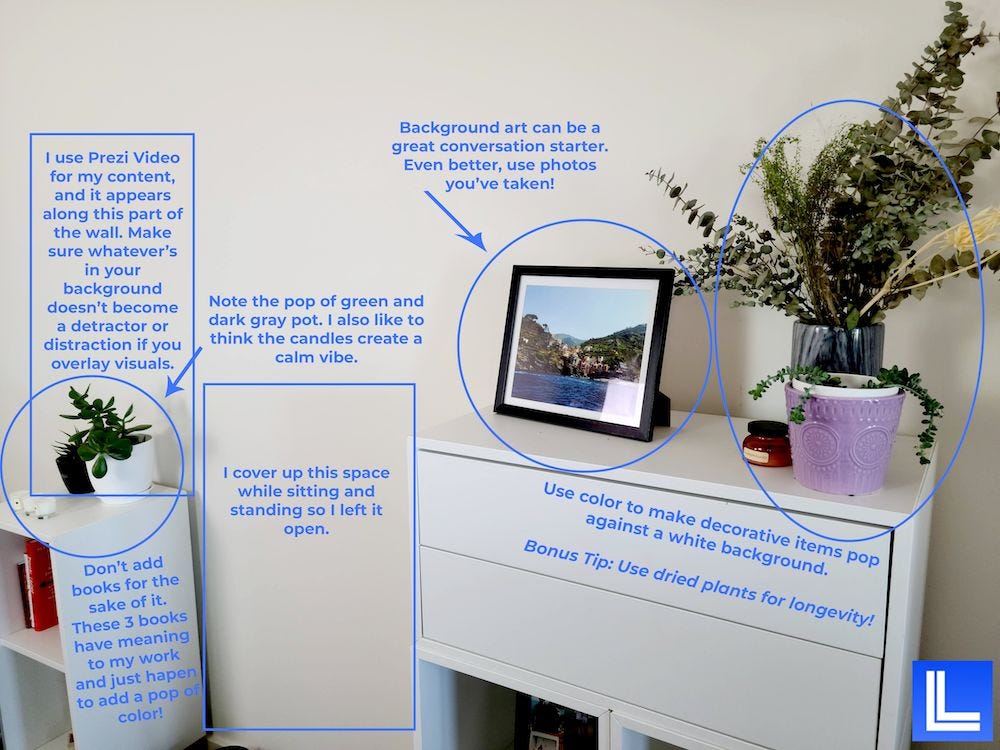
- Plants: A touch of greenery can instantly liven up a space, adding color and a sense of organic life. Choose plants that are relatively low-maintenance and visually appealing, such as a snake plant, a ZZ plant, or a small potted fern.
- Books: A stack of books, artfully arranged on a shelf or table, can suggest knowledge, intellect, or a specific area of interest. Vary the sizes and colors of the books for visual appeal.
- Artwork: A framed print, a photograph, or even a small sculpture can add a significant touch of personality and sophistication. Ensure the artwork complements your overall aesthetic and isn’t too distracting.
- Personal Items: Consider incorporating items that reflect your hobbies or passions, such as a vintage camera, a musical instrument, or awards. These can make your background feel more authentic and relatable.
- Candles or Small Lamps: These can add a warm, inviting glow, especially when used strategically to highlight certain areas or create a cozy atmosphere.
Utilizing Lighting for Mood and Focus
Lighting is arguably the most powerful tool in your background creation arsenal. It dictates the mood, directs the viewer’s attention, and can dramatically enhance the perceived quality of your video. Understanding how to manipulate light will elevate your background from static to dynamic.The goal is to use light to shape the background, making it complementary to your subject rather than a distraction.
This involves considering both the type of light and its placement.
- Key Light: This is your primary light source, often aimed at your subject. The background lighting should complement, not compete with, your key light.
- Fill Light: Used to soften shadows created by the key light. For backgrounds, a subtle fill light can prevent areas from appearing too dark and losing detail.
- Background Light: This light is specifically aimed at the background to create separation, add depth, or highlight specific elements. A softbox or a simple LED panel can be used for this purpose.
- Creating Mood: Warmer light temperatures (yellowish tones) tend to create a cozy, intimate, or relaxed mood, while cooler light temperatures (bluish tones) can evoke a more professional, modern, or serious atmosphere.
- Highlighting Props: Use small accent lights, like spotlights or even desk lamps, to draw attention to specific props that you want to emphasize, such as a framed certificate or an interesting piece of decor.
- Silhouetting: In some cases, you might intentionally underexpose the background relative to your subject to create a subtle silhouette effect, drawing all focus to the person speaking.
Creating a Sense of Depth and Dimension
A flat, two-dimensional background can feel unengaging. Introducing depth and dimension makes your video more visually interesting and professional, giving the viewer a sense of space.This can be achieved through a combination of strategic placement of elements and thoughtful lighting. The idea is to create layers that guide the viewer’s eye and add visual richness.
- Layering: Place elements at varying distances from the camera. Your subject should be in the foreground, with props and decor placed at different depths behind them.
- Using a Shelf or Cabinet: A bookshelf or a cabinet naturally creates multiple planes of depth, allowing you to arrange items at different levels.
- Background Blur (Bokeh): While not strictly a background creation technique, using a wider aperture on your camera can create a pleasing background blur, which can enhance the sense of depth and make your subject pop.
- Light and Shadow Play: As mentioned in the lighting section, using light to create subtle shadows can also contribute to a sense of dimension, giving objects form and separating them from the wall.
- Diagonal Lines: Elements placed on a diagonal can create a more dynamic and less static feel, contributing to a sense of depth and movement.
Achieving a Professional Look on a Limited Budget
Creating a professional-looking background is achievable even with minimal resources. The key is to be resourceful, prioritize, and focus on impactful, low-cost solutions.Many effective techniques rely on smart arrangement and utilization of existing elements rather than expensive purchases.
- Declutter: The most important and cheapest step is to declutter your shooting space. A clean, organized background is the foundation of a professional look.
- Utilize Natural Light: Position yourself near a window to take advantage of free, soft, and flattering natural light. Avoid direct sunlight, which can be harsh.
- DIY Backdrops: Consider using affordable materials like large sheets of fabric (e.g., velvet, linen, or even a plain colored bedsheet) stretched taut or hung creatively.
- Repurpose Household Items: Look around your home for items that can be used as props. A neatly arranged stack of books, a decorative vase, or even a well-placed houseplant can work wonders.
- Strategic Placement: Even a simple wall can be enhanced by carefully placing one or two well-chosen items. Less is often more when on a budget.
- Focus on the Foreground: If your background is very simple, ensure your subject is well-lit and the focus is clearly on them. This can compensate for a less elaborate background.
Prop Placement for a Talking-Head Video
For talking-head videos, where the focus is primarily on the speaker, strategic prop placement is crucial to add visual interest without distraction. The goal is to create a balanced and appealing composition that supports the speaker.The following table provides a basic framework for prop placement, assuming a standard talking-head setup. Remember to adapt these suggestions based on your specific background and the overall message you want to convey.
| Prop Type | Placement Suggestion | Effect |
|---|---|---|
| Plant | Behind subject, slightly off-center, at mid-height | Adds life, color, and a touch of nature; softens the background |
| Book Stack | On a shelf or table, balanced, not too high or low | Suggests knowledge, personality, or a specific interest; adds texture |
| Artwork | Wall, at eye-level with the subject, slightly to the side | Adds visual interest, personality, and a focal point without competing |
| Small Lamp or Candle | On a shelf or table, casting a warm glow on a prop or the wall | Adds ambiance, depth, and a sense of warmth or sophistication |
| Personal Item (e.g., a trophy, a camera) | Subtly placed, not directly behind the subject’s head | Adds a personal touch, hints at hobbies or achievements, makes the speaker relatable |
Leveraging Digital Tools for Backgrounds
In today’s digital age, a vast array of powerful tools and techniques are available to create stunning and dynamic video backgrounds without the need for physical sets. These digital solutions offer unparalleled flexibility, creativity, and efficiency, allowing you to transform your videos into visually captivating experiences.The effective use of digital tools opens up a world of possibilities, from seamless compositing to intricate animations.
By understanding and applying these technologies, you can elevate the production value of your videos significantly, making them more engaging and professional.
Green Screen Compositing Techniques
Green screens, also known as chroma keying, are a fundamental digital tool for replacing backgrounds. This technique involves filming your subject against a solid, uniformly colored backdrop (typically green or blue) and then digitally removing that color to insert a different background image or video. Achieving a clean and professional green screen effect requires careful attention to lighting, subject separation, and the quality of the green screen material itself.
Proper lighting ensures an even color distribution on the screen, minimizing shadows and highlights that can complicate the keying process.For optimal results, ensure your subject is well-lit and distinct from the green screen. Avoid wearing clothing that matches the green screen color, as this will also be keyed out. When editing, software algorithms analyze the color values and make them transparent, allowing you to layer your chosen background behind your subject.
Selecting and Editing Digital Backdrops
The selection and editing of digital backdrops are crucial for creating a cohesive and appealing visual. When choosing a backdrop, consider its resolution, aspect ratio, and overall aesthetic to ensure it complements your subject and video content. High-resolution images and videos are essential to avoid pixelation when scaled. The mood and style of the backdrop should align with the message and tone of your video.Editing digital backdrops involves color correction, cropping, and sometimes even subtle animation to bring them to life.
You might adjust the brightness, contrast, or color balance to match the lighting of your foreground footage. Cropping can help frame your subject more effectively, and adding subtle movement, like a gentle breeze in a nature scene or a slow pan across a cityscape, can make the background feel more dynamic and immersive.
Graphic Design Elements in Digital Backgrounds
Graphic design elements play a vital role in enhancing digital backgrounds, adding depth, information, and visual interest. These elements can range from simple text overlays and logos to complex abstract patterns and illustrative graphics. Integrating graphic design elements strategically can help reinforce your brand identity, convey key messages, or simply create a more visually engaging environment. For instance, subtle geometric shapes or gradient overlays can add a modern and sophisticated feel, while animated icons can highlight specific points or add a playful touch.When incorporating graphic elements, it’s important to maintain visual hierarchy and avoid clutter.
The background should support, not overpower, your main subject. Consistency in font choices, color palettes, and design styles across all graphic elements is key to a polished look.
Creating Animated Backgrounds
Animated backgrounds offer a dynamic and captivating way to enhance video appeal. Unlike static images, animated backgrounds introduce movement, adding a sense of life and energy to your scenes. This can be anything from subtle, flowing particles and soft light shifts to more complex motion graphics and looping video sequences. Animated backgrounds can effectively guide the viewer’s eye, create a specific mood, or even tell a subtle story.The impact of animated backgrounds is significant, especially in explainer videos, corporate presentations, or even creative vlogs.
They can break up monotony, maintain viewer attention, and contribute to a more professional and polished final product. For example, a slowly rotating abstract pattern can provide a calming backdrop for a meditation video, while a fast-paced, data-driven animation might be ideal for a financial report.
Popular Software and Tools for Digital Background Creation
A variety of powerful software and tools are available to assist in the creation of digital backgrounds, catering to different skill levels and project needs.
- Adobe Photoshop: An industry-standard for image editing and manipulation, Photoshop is excellent for creating and editing static digital backdrops, compositing images, and preparing assets for further use.
- Canva: A user-friendly, web-based design platform, Canva offers a vast library of templates, images, and graphic elements that can be easily customized to create attractive video backgrounds, especially for social media and simpler projects.
- GIMP (GNU Image Manipulation Program): A free and open-source alternative to Photoshop, GIMP provides a comprehensive suite of tools for image editing and creation, making it a powerful option for budget-conscious creators.
- DaVinci Resolve: This professional-grade video editing software includes robust tools for color correction, visual effects, and, crucially, highly effective green screen compositing, allowing for seamless background replacement.
- After Effects: The industry-leading software for motion graphics and visual effects, After Effects is indispensable for creating complex animated backgrounds, dynamic text animations, and intricate visual sequences.
Ensuring Visual Harmony and Cohesion

Creating a visually appealing background isn’t just about picking something pretty; it’s about crafting an environment that supports and enhances your video’s message. This involves a thoughtful approach to color, texture, and overall composition to ensure everything works together seamlessly. A harmonious background guides the viewer’s eye, reinforces your brand, and contributes to a professional and memorable viewing experience.Achieving visual harmony means ensuring all elements within your video, particularly the background, work in concert with your subject matter and overall aesthetic.
This section delves into the key principles that help you build a cohesive and impactful visual foundation for your content.
Color Selection for Complementary Aesthetics
The strategic use of color in your background can significantly influence the viewer’s perception and emotional response. Colors are powerful tools that can evoke specific moods, highlight important aspects of your subject, and reinforce your brand identity. Choosing colors that complement your subject and message is crucial for creating a unified and impactful visual narrative.Here are key considerations for selecting background colors:
- Understanding Color Psychology: Different colors evoke different emotions. For example, blues and greens often convey calmness and trust, making them suitable for educational or corporate content. Reds and oranges can create excitement and energy, fitting for dynamic product demonstrations or entertainment. Yellows can be cheerful and attention-grabbing, while purples can suggest creativity or luxury.
- Complementing the Subject: Consider the dominant colors of your subject (e.g., clothing, products, or on-screen graphics). The background colors should either contrast slightly to make the subject pop or harmonize by using analogous colors to create a sense of unity. For instance, if your subject is wearing a blue shirt, a background with complementary orange or yellow tones will make the shirt stand out.
- Reinforcing Brand Identity: If you have established brand colors, incorporate them subtly into your background. This consistent use of brand colors across all your videos builds strong brand recognition and a professional image.
- Message Alignment: The mood and tone of your message should be reflected in your color choices. A serious documentary might benefit from muted, desaturated tones, while a lighthearted tutorial could utilize brighter, more vibrant colors.
- Accessibility: Ensure sufficient contrast between your subject and the background for readability and viewer comfort, especially for text overlays or on-screen graphics.
The Contribution of Background Texture to Visual Appeal
Texture in a video background adds depth, interest, and a tactile quality that can significantly enhance its visual appeal. It moves beyond flat, uniform surfaces to create a more engaging and sophisticated look. The right texture can make a background feel more realistic, inviting, or even abstract, depending on the desired effect.The impact of texture can be understood through these points:
- Adding Depth and Dimension: Textured backgrounds, such as wood grain, fabric weaves, or subtle patterns, create visual interest by playing with light and shadow. This adds a sense of depth that a plain, flat background lacks, making the scene feel more immersive.
- Evoking Mood and Atmosphere: Rough textures like brick or concrete can convey a sense of urban grit or industrial strength, while smoother textures like silk or polished wood might suggest elegance and refinement. Natural textures like stone or foliage can bring a sense of calm and organic beauty.
- Enhancing Subject Focus: A subtly textured background can provide a visually interesting yet non-distracting environment for your subject. It offers enough visual stimulation to keep the viewer engaged without pulling attention away from the main focus of the video.
- Creating a Sense of Place: Textures are often strongly associated with specific environments. For example, the texture of sand and shells immediately suggests a beach, while the texture of aged paper might imply a historical setting.
- Digital vs. Physical Textures: Both physical backdrops with real textures and digitally generated textures can be effective. Digital textures offer immense flexibility, allowing for intricate and customizable patterns, while physical textures can provide a more authentic and organic feel.
Strategies for Maintaining Consistent Background Style
Consistency in your video backgrounds across multiple productions is vital for building a recognizable brand identity and a professional, cohesive visual library. Viewers should be able to identify your content not just by your face or voice, but also by its distinct visual style.Effective strategies for maintaining background consistency include:
- Establishing a Style Guide: Develop a simple style guide that Artikels your preferred background elements, color palettes, and overall aesthetic. This guide serves as a reference for anyone creating or approving video content.
- Utilizing a Signature Backdrop: Invest in a high-quality physical backdrop or create a consistent digital template that you use for most of your videos. This could be a specific color, a branded pattern, or a carefully curated set design.
- Defining a Color Palette: Stick to a defined color palette for your backgrounds that aligns with your brand. This ensures that even if the specific backdrop changes slightly, the overall color scheme remains recognizable.
- Standardizing Lighting: Consistent lighting is as important as background visuals. Employ the same lighting setup and style across your videos to ensure a uniform look and feel.
- Template-Based Digital Backgrounds: For digital backgrounds, create reusable templates in design software. This allows for quick and consistent application of your chosen aesthetic, ensuring elements like logos or specific patterns are always placed identically.
The Impact of Busy vs. Uncluttered Backgrounds on Viewer Attention
The density and complexity of your background have a direct impact on how viewers perceive and engage with your content. A well-chosen background can enhance focus, while an overly busy one can detract from your message and lead to viewer fatigue.Consider the following comparisons:
- Busy Backgrounds: These often contain numerous elements, high contrast patterns, or a lot of visual information. While they can be visually stimulating, they risk distracting viewers from the main subject. This can lead to a reduced comprehension of your message and a feeling of overwhelm. For instance, a background with rapidly moving patterns or many distinct objects could pull the viewer’s attention away from what you are saying or demonstrating.
- Uncluttered Backgrounds: These are characterized by simplicity, clean lines, and minimal visual elements. They serve to frame the subject, guide the viewer’s eye, and minimize distractions. An uncluttered background helps viewers concentrate on the content being presented, leading to better information retention and a more pleasant viewing experience. A plain colored wall, a subtly blurred natural scene, or a simple geometric pattern are examples of uncluttered backgrounds.
- The Sweet Spot: The ideal background often lies somewhere in between. It should have enough visual interest to be engaging but not so much that it becomes distracting. This might involve a background with a subtle texture, a soft gradient, or a carefully composed arrangement of a few key elements that complement, rather than compete with, the subject.
Identifying and Mitigating Visual Clutter
Visual clutter occurs when too many elements compete for the viewer’s attention, creating a sense of disorganization and distraction. Identifying these elements and implementing strategies to reduce them is key to achieving a clean and effective background.Elements that commonly create visual clutter and how to mitigate them include:
- Excessive Objects: Too many props, decorations, or items in the background can overwhelm the viewer. Mitigation: Declutter your space by removing unnecessary items. Keep only essential props that directly support your message or brand.
- High-Contrast Patterns: Busy, high-contrast patterns can be visually jarring and distracting. Mitigation: Opt for simpler, more subtle patterns or solid colors. If you must use a pattern, ensure it has low contrast and is not too dense.
- Unorganized Elements: Items that are out of place, askew, or not intentionally arranged can create a sense of chaos. Mitigation: Pay close attention to the arrangement of all background elements. Ensure everything is neat, aligned, and thoughtfully placed.
- Competing Colors: A cacophony of clashing or overly bright colors can be overwhelming. Mitigation: Adhere to a limited and harmonious color palette. Ensure background colors complement, rather than compete with, your subject and brand colors.
- Unnecessary Text or Graphics: On-screen text or graphics that are not essential to the message can add to clutter. Mitigation: Be judicious with text and graphics. Ensure they are clear, concise, and strategically placed, and remove any that are not serving a purpose.
- Poor Lighting: Shadows or overly bright spots can create distracting visual noise. Mitigation: Ensure consistent and balanced lighting. Avoid harsh shadows that obscure parts of the background or create distracting highlights.
Adapting Backgrounds for Different Platforms and Formats
As video content proliferates across various digital landscapes, understanding how to tailor your visual backgrounds to suit different platforms and formats is crucial for maximizing impact and engagement. What works beautifully on a widescreen YouTube video might appear awkward or ineffective on a vertical Instagram Story. This section delves into the nuances of adapting your background design choices to ensure they resonate with the specific requirements and user expectations of each platform.The fundamental aspect influencing background design is the aspect ratio of the video format.
Aspect ratio dictates the proportional relationship between the width and height of the screen. Different platforms and video types are optimized for specific aspect ratios, which directly impacts how your background will be framed and perceived by the viewer.
Aspect Ratio Influence on Background Design
The aspect ratio of a video significantly shapes the composition and effectiveness of its background. A wider aspect ratio, like 16:9 for traditional YouTube videos, allows for more horizontal depth and subtle visual elements that can guide the viewer’s eye across the screen. Conversely, a narrower aspect ratio, such as 9:16 for vertical formats like Instagram Reels or TikTok, demands a more focused and vertically oriented design.
Foreground elements become more prominent, and the background needs to complement rather than overwhelm the subject.
Vertical Video Background Considerations
Creating backgrounds for vertical video formats, commonly found on platforms like Instagram Stories, TikTok, and YouTube Shorts, requires a distinct approach. The entire frame is viewed from top to bottom, meaning any background elements need to be strategically placed to avoid being cut off or appearing cluttered. It’s often beneficial to place the main subject slightly off-center to create visual interest within the vertical space.
The background should be engaging enough to hold attention in a scrollable feed but not so busy that it distracts from the core message or talent.
Optimizing Backgrounds for Various Screen Sizes
In today’s multi-device viewing environment, backgrounds must be adaptable to a range of screen sizes, from large desktop monitors to small smartphone screens. This means ensuring that key visual elements remain visible and impactful regardless of the display. For instance, a background with a subtle gradient might look excellent on a large screen but could become a solid, uninteresting block of color on a smaller device.
Designers should prioritize clear focal points and ensure that important information or branding is not lost in translation across different resolutions and aspect ratios.
Background Choices and Platform Engagement
The choice of background can profoundly influence viewer engagement on different platforms. On platforms like YouTube, where viewers might spend more time with a video, a more elaborate or thematically rich background can enhance the storytelling and brand immersion. For fast-paced, ephemeral content on platforms like Instagram Reels, a dynamic, visually stimulating, or branded background can immediately capture attention and encourage viewers to stop scrolling.
A clean, professional background might be preferred for corporate explainer videos, while a more creative and unconventional background could be ideal for vlogs or artistic content, aligning with the platform’s typical content style and audience expectations.
Background Considerations for YouTube vs. Instagram Reels
To further illustrate the differences, consider the following comparison of background considerations for two prominent platforms:
| Platform | Aspect Ratio | Key Background Considerations |
|---|---|---|
| YouTube | 16:9 | Horizontal composition, depth, less need for extreme foreground elements. Focus on creating a sense of space and context that complements the presenter and content. Elements can be placed to the sides to add visual interest without competing with the central subject. |
| Instagram Reels | 9:16 | Vertical composition, prominent foreground elements, clear focal point. Backgrounds should be visually striking and complementary to the subject, often designed to fill the entire vertical frame. Emphasis on bold colors, patterns, or dynamic motion that grabs attention quickly. |
Conclusion
In essence, a well-designed video background is not merely a backdrop but an integral component of your narrative. By understanding the fundamentals, exploring diverse aesthetics, meticulously planning, and employing practical techniques, you can consistently create captivating visual environments. Whether using simple props or sophisticated digital tools, the goal is to achieve a cohesive and impactful presentation that resonates with your audience and enhances your message.