Beginning with How to Plan Your Video Production from Start to Finish, this guide will illuminate the path from your initial spark of an idea to the polished final product. We will meticulously dissect each stage, ensuring that your creative vision is realized with efficiency and impact.
This comprehensive overview delves into the essential elements of successful video creation, from defining your project’s core purpose and audience to the intricate details of scripting, budgeting, and execution. By understanding and implementing these crucial steps, you can navigate the complexities of video production with confidence, transforming your concepts into compelling visual narratives that resonate with your intended viewers.
Defining Your Video Project’s Objectives and Audience
Before embarking on the exciting journey of video production, it is crucial to establish a clear understanding of what you aim to achieve and for whom. This foundational step ensures that every subsequent decision, from scripting to distribution, aligns with your overarching goals and resonates effectively with your intended viewers.Defining your objectives and audience is not merely a preliminary formality; it is the compass that guides your entire production process.
Without this clarity, your video risks becoming unfocused, failing to connect with its intended viewers, and ultimately not achieving the desired impact. A well-defined purpose and audience will inform creative choices, resource allocation, and measurement of success.
Primary Goals for Video Content
Identifying the primary goals for your video content is the bedrock of a successful production. These objectives dictate the narrative, tone, style, and ultimately, the effectiveness of your final product. They answer the fundamental question: “What do we want this video to accomplish?”The objectives can be diverse and multifaceted, often serving a combination of strategic purposes. Understanding these distinct aims will allow for a more tailored and impactful video creation.
- Brand Awareness: To introduce or reinforce your brand identity, values, and unique selling propositions to a wider audience. This could involve showcasing your company culture, history, or the impact of your products/services.
- Lead Generation: To attract potential customers and encourage them to take a specific action, such as signing up for a newsletter, downloading a resource, or requesting a demo.
- Sales and Conversions: To directly drive purchases or sign-ups by highlighting product benefits, offering testimonials, or creating a sense of urgency.
- Customer Education and Support: To explain how to use a product, troubleshoot common issues, or provide in-depth information about a service, thereby reducing support inquiries and improving customer satisfaction.
- Internal Communication and Training: To inform employees about company updates, policies, or to provide comprehensive training on new procedures or software.
- Engagement and Community Building: To foster a sense of community around your brand, encourage discussion, and build loyalty through relatable and shareable content.
Pinpointing and Understanding the Target Audience
Once your objectives are clear, the next critical step is to thoroughly understand the audience you intend to reach. Knowing your audience intimately allows you to tailor your message, language, and visual style to resonate with their needs, interests, and preferences. This deep understanding is paramount for creating content that not only captures attention but also inspires action.To effectively pinpoint and understand your target audience, consider employing a multi-faceted approach that goes beyond basic demographics.
This involves delving into their motivations, behaviors, and the platforms they frequent.
- Demographic Analysis: This includes age, gender, location, income level, education, and occupation. For instance, a video aimed at Gen Z consumers will likely employ different visual aesthetics and language than one targeting retirees.
- Psychographic Profiling: This explores your audience’s interests, hobbies, values, attitudes, lifestyles, and opinions. Understanding their aspirations and challenges will help you craft a more emotionally resonant message. For example, a fitness brand targeting health-conscious individuals might focus on themes of personal achievement and well-being.
- Behavioral Insights: Analyze how your audience interacts with online content, their media consumption habits, their purchasing behaviors, and their brand loyalties. This can inform where and how you distribute your video. A B2B audience, for instance, might be more receptive to detailed case studies on LinkedIn than short, entertaining clips on TikTok.
- Pain Points and Needs: Identify the problems your audience faces that your product or service can solve. Your video should clearly articulate how you can alleviate their concerns or fulfill their desires.
- Platform Preferences: Determine which social media platforms, websites, or other channels your target audience actively uses. This will guide your distribution strategy and content format.
Statement of Purpose
A clear and concise statement of purpose acts as the guiding star for your entire video production. It distills your objectives and audience understanding into a single, actionable declaration that ensures everyone involved in the project remains aligned and focused. This statement should be easily communicable and serve as a constant reference point throughout the creative and production phases.This statement should be more than just a mission statement; it should be a practical directive that informs every decision made during the production lifecycle.
The purpose of this video is to [specific action/outcome] for [target audience] by [key message/benefit], ultimately leading to [desired impact].
For example, a statement of purpose for a new software product might read: “The purpose of this explainer video is to educate small business owners about the time-saving features of our new accounting software, ultimately leading to a 15% increase in demo requests within the first quarter.” This statement clearly defines the audience, the core message, and the desired outcome, providing a solid foundation for the entire production.
Developing the Video Concept and Narrative
With your project objectives and target audience clearly defined, the next crucial step is to translate these insights into a compelling video concept and a captivating narrative. This phase is where your video truly comes to life, shaping the message and emotional resonance it will have with your viewers. A well-developed concept and narrative are the backbone of any successful video production.This section will guide you through the process of ideation, structuring your story, and crafting a narrative arc that keeps your audience engaged from the initial seconds to the final frame.
We will explore techniques for generating creative ideas and methods for organizing the fundamental elements of storytelling to ensure your message is delivered effectively and memorably.
Brainstorming Compelling Video Ideas
Generating original and impactful ideas is the foundation of a strong video concept. This involves exploring various avenues to spark creativity and ensure your video stands out. Effective brainstorming encourages a free flow of thoughts, allowing for the exploration of diverse perspectives and potential approaches.To facilitate a productive brainstorming session, consider employing a combination of the following methods:
- Mind Mapping: Start with a central theme or objective and branch out with related ideas, s, and visual cues. This visual approach helps uncover connections and expand upon initial thoughts.
- Word Association: Write down a core concept or and then list words or phrases that come to mind. Continue this process, building a web of interconnected ideas.
- Storyboarding Sessions: Even in the early stages, sketching out potential scenes or sequences can reveal narrative possibilities and visual styles. This is a highly collaborative method.
- Competitor Analysis: Reviewing successful videos within your niche or industry can provide inspiration, highlighting what resonates with audiences and identifying potential gaps or opportunities for differentiation.
- Audience Persona Deep Dive: Revisit your audience personas and imagine what kind of content would genuinely capture their attention, solve their problems, or evoke a desired emotion.
- “What If” Scenarios: Pose hypothetical questions related to your topic to explore unexpected angles and creative solutions. For instance, “What if our product could talk?” or “What if we showed the problem from the customer’s perspective?”
Organizing Storytelling Elements
Once a core concept begins to take shape, it’s essential to organize the fundamental elements of your narrative. This structured approach ensures clarity, coherence, and a logical progression of your message. Without a clear organization of these elements, even the most brilliant ideas can become muddled and lose their impact.The key components of storytelling to consider include:
- Plot: This refers to the sequence of events that unfold in your video. It’s the “what happens.” A strong plot has a clear beginning, middle, and end, with events logically connected.
- Characters: These are the individuals or entities that drive the narrative. They can be real people, animated figures, or even personified objects. Characters should have motivations, goals, and relatable traits. For a brand video, your audience or a representative of your brand might serve as the primary character.
- Themes: These are the underlying messages or ideas that your video explores. Themes provide depth and meaning to your story. For example, a theme could be “innovation,” “community,” “overcoming challenges,” or “the power of connection.”
- Conflict/Problem: Most compelling narratives involve some form of conflict or a problem that needs to be addressed. This creates tension and drives the plot forward. In a marketing video, this might be a customer’s pain point.
- Resolution: This is how the conflict or problem is resolved. It’s the outcome that leaves the audience with a sense of closure or understanding. In a solution-oriented video, the resolution often showcases the benefits of your product or service.
Designing an Engaging Narrative Arc
A well-designed narrative arc is crucial for holding viewer attention throughout the video. It creates a journey for the audience, guiding them through emotional highs and lows, building anticipation, and delivering a satisfying conclusion. A simple linear progression might not be enough; a compelling arc often incorporates elements of rising action, climax, and falling action.Consider the following structure for your narrative arc:
- Exposition (Beginning): Introduce your characters, setting, and the initial situation. For a video, this might be a brief introduction to the problem or the context your audience faces. The goal is to quickly establish relevance and pique curiosity.
- Inciting Incident: This is the event that kicks off the main conflict or introduces the central challenge. It disrupts the status quo and sets the story in motion.
- Rising Action: A series of events that build tension and develop the conflict. This is where the stakes are raised, and the audience becomes more invested in the outcome. For a product demonstration, this might involve showcasing the challenges of the current situation before introducing the solution.
- Climax: The turning point of the story, the moment of highest tension or greatest emotional intensity. This is where the conflict is confronted directly. In a brand story, this could be the moment of breakthrough or the realization of a solution.
- Falling Action: The events that occur after the climax, leading towards the resolution. The tension begins to decrease, and loose ends are tied up.
- Resolution (End): The conclusion of the story, where the conflict is resolved, and a new normal is established. This is your opportunity to reinforce your key message or call to action.
A powerful narrative arc often employs emotional storytelling. For instance, a video about a charity’s impact might start with a depiction of hardship (exposition), introduce a specific case study (inciting incident), show the challenges faced by the individual or community (rising action), highlight the pivotal moment of support (climax), and then illustrate the positive transformation (falling action and resolution). This emotional journey makes the message more impactful and memorable.
Scripting and Storyboarding the Visuals
With your project objectives and concept clearly defined, the next crucial step is to translate these ideas into a tangible plan for your video. This involves meticulously crafting a script that Artikels the dialogue and actions, and then visualizing these elements through a storyboard, which acts as a blueprint for the entire production.This phase is where the narrative truly comes to life and where you ensure that every visual element serves the story and resonates with your intended audience.
A well-executed script and storyboard are the cornerstones of efficient production, saving time and resources by pre-empting potential issues and ensuring a cohesive final product.
Writing a Professional Video Script
A professional video script is more than just dialogue; it’s a comprehensive document that guides every aspect of the filming process. It requires clarity, conciseness, and a clear understanding of the desired tone and message.Here’s a step-by-step guide to writing an effective video script:
- Artikel Key Talking Points: Before writing any dialogue, list the essential messages or information you need to convey. This ensures that no critical points are missed.
- Develop the Narrative Arc: Even for informational videos, a simple narrative structure (beginning, middle, end) can make the content more engaging. Consider how you will introduce the topic, present the core information, and conclude.
- Write Dialogue and Voiceover: Craft dialogue that sounds natural and engaging for the intended audience. For voiceovers, ensure the language is clear, concise, and appropriate for the video’s tone. Read it aloud to check for flow and rhythm.
- Describe Visual Actions and Settings: For each scene or dialogue segment, describe the necessary visual actions, camera movements, on-screen graphics, and the setting. This is crucial for the director and crew.
- Format for Clarity: Use a standard script format, typically with character names or voiceover labels on the left, and dialogue or descriptions on the right. This dual-column format is industry-standard and aids in clear communication.
- Include Technical Notes: Add any specific technical requirements, such as sound effects, music cues, or specific camera angles, directly into the script.
- Review and Refine: Share the script with stakeholders for feedback and make revisions. A polished script is essential before moving to the visual planning stage.
Translating Script Elements into Visual Sequences with Storyboarding
A storyboard is a visual representation of your script, breaking it down into a series of panels that depict key scenes and shots. It acts as a visual roadmap, allowing you to anticipate how the video will look and flow before filming begins.The process of creating a storyboard involves translating the written word into visual language:
- Analyze the Script Scene by Scene: Go through your script and identify each distinct scene or shot that needs to be visualized.
- Sketch Key Frames: For each scene, create a rough sketch or illustration that captures the most important visual elements. This includes character placement, camera angle, action, and background.
- Annotate Each Panel: Beneath each visual panel, add brief notes that describe the action, dialogue, camera movement (e.g., pan, zoom, tilt), sound effects, and any on-screen text or graphics.
- Indicate Transitions: Show how one shot or scene transitions to the next (e.g., cut, fade, dissolve).
- Consider Shot Composition: Think about the framing of each shot – close-up, medium shot, wide shot – and how it contributes to the storytelling.
- Iterate and Refine: Just like the script, the storyboard is an iterative process. Review it to ensure it accurately reflects the script and that the visual flow is logical and compelling.
Ensuring Script and Storyboard Alignment for Effective Visual Communication
The synergy between the script and storyboard is paramount for a successful video production. When these two elements are in sync, they create a clear and cohesive vision that minimizes misinterpretation and maximizes efficiency during filming.Techniques for ensuring this alignment include:
- Regular Cross-Referencing: Constantly refer back to the script while storyboarding and vice versa. Every visual element in the storyboard should directly correspond to a line of dialogue, action, or descriptive note in the script.
- Consistent Terminology: Use the same terms for characters, locations, and actions in both documents to avoid confusion.
- Collaborative Review: Involve key team members, such as the director, cinematographer, and editor, in reviewing both the script and the storyboard together. This facilitates a shared understanding and allows for early identification of any discrepancies.
- Visualizing Dialogue: For every line of dialogue, consider how it will be visually represented. A character speaking might be shown in a close-up, or their words could be accompanied by a relevant graphic.
- Mapping Actions to Script Cues: Ensure that all actions described in the script are clearly depicted in the corresponding storyboard panels, including the timing and execution of those actions.
- Pre-visualization Tools: For complex scenes, consider using simple 3D modeling software or animatics to pre-visualize the shots. This can help identify potential staging or camera issues that might not be apparent in a static storyboard.
- Focus on the Audience Experience: Both the script and storyboard should be evaluated from the perspective of the intended audience. Does the narrative flow logically? Are the visuals clear and supportive of the message?
“The script is the soul of the film, and the storyboard is its body.”
This analogy highlights that one cannot exist effectively without the other. The script provides the meaning and intent, while the storyboard gives it form and structure, ensuring that the intended message is communicated visually and effectively.
Budgeting and Resource Allocation
Once your video project’s objectives, audience, concept, narrative, script, and storyboard are firmly established, the critical phase of budgeting and resource allocation begins. This stage transforms your creative vision into a tangible plan, ensuring that financial and human resources are utilized efficiently and effectively to achieve your production goals. A well-structured budget acts as a roadmap, guiding your decisions and preventing scope creep that can derail your project.Effectively managing your budget requires a detailed understanding of all potential expenditures.
This involves breaking down the production process into its core components and identifying the costs associated with each. By meticulously documenting every anticipated expense, you can gain a clear picture of the financial commitment required and make informed decisions about where to invest your resources.
Essential Components of a Comprehensive Video Production Budget
A robust video production budget is a detailed document that accounts for every potential cost from pre-production through post-production and distribution. It serves as a financial blueprint, ensuring that all aspects of the project are adequately funded and that expenditures are tracked meticulously. The primary goal is to achieve the highest possible production value within the defined financial constraints.A comprehensive budget typically includes the following key categories:
- Pre-production Costs: These encompass all expenses incurred before principal photography begins. This includes script development, storyboarding, location scouting, casting, permits, and preliminary research.
- Production Costs: This is often the largest segment of the budget, covering expenses during the actual filming or recording phase. It includes crew salaries, equipment rental (cameras, lighting, sound gear), talent fees, location fees, catering, travel, and accommodation.
- Post-production Costs: These expenses are incurred after filming is complete. They involve editing, sound mixing, color grading, visual effects, motion graphics, music licensing, and voice-over recording.
- Distribution and Marketing Costs: While sometimes separate, these are crucial for a video’s success. They can include costs for online hosting, advertising, promotional materials, and public relations efforts.
- Contingency: A vital but often overlooked component, a contingency fund (typically 10-20% of the total budget) is set aside to cover unforeseen expenses or unexpected challenges that may arise during production.
Checklist of Potential Video Production Expenses
To ensure no critical cost is overlooked, a detailed checklist is indispensable. This list helps in estimating and tracking expenditures across all phases of production. It’s advisable to consult with experienced production professionals or utilize budgeting templates to ensure completeness.The following checklist Artikels common expenses encountered in video production:
Pre-Production Expenses:
- Scriptwriting/Adaptation Fees
- Storyboarding and Concept Art
- Location Scouting Fees and Travel
- Permits and Licenses (e.g., filming permits, music clearances)
- Casting Director Fees
- Talent Auditions and Readings
- Legal Fees (contracts, releases)
- Pre-visualization services
Production Expenses:
- Director’s Fee
- Producer’s Fee
- Cinematographer/Director of Photography Fee
- Camera Crew (operators, assistants)
- Gaffer (chief lighting technician) and Lighting Crew
- Sound Mixer and Boom Operator
- Grip Equipment and Crew
- Art Department (production designer, set dressers)
- Wardrobe and Makeup Artists
- Actors/Talent Fees (including extras)
- Equipment Rental (cameras, lenses, lighting, grip, sound, monitors)
- Location Rental Fees
- Set Construction Materials
- Catering and Craft Services
- Transportation (crew, equipment)
- Accommodation (for cast and crew if necessary)
- Insurance (production liability, equipment)
Post-Production Expenses:
- Editor’s Fee
- Assistant Editor Fee
- Sound Designer/Editor Fee
- Foley Artist Fees
- Music Composer/Licensing Fees
- Voice-over Artist Fees
- Visual Effects (VFX) Artist Fees
- Motion Graphics Designer Fee
- Colorist Fee
- Post-production Supervisor Fee
- Rendering and Mastering Costs
- Stock Footage/Music Licensing
Distribution and Marketing Expenses:
- Video Hosting Platform Fees (e.g., YouTube Premium, Vimeo Pro)
- Website Development/Updates
- Social Media Advertising Budget
- Public Relations Agency Fees
- Creation of Promotional Materials (e.g., trailers, social media assets)
- Translation and Subtitling Services
Framework for Allocating Financial Resources Effectively
Effective resource allocation ensures that funds are directed towards the most impactful areas of production, aligning with the project’s priorities and objectives. This involves a strategic approach to distributing the budget across different stages and elements of the video production lifecycle.A common and effective framework for resource allocation involves prioritizing based on the project’s specific needs and potential return on investment.
For instance, a documentary might allocate more resources to research and archival footage, while a narrative film would focus heavily on talent and set design.Consider the following approach to resource allocation:
- Phase-Based Allocation: Distribute the budget across pre-production, production, and post-production phases. Typically, production consumes the largest portion, followed by post-production, and then pre-production. A general guideline might be:
- Pre-production: 15-25%
- Production: 40-60%
- Post-production: 25-40%
This is a flexible model and can be adjusted based on project complexity. For example, a highly complex VFX-heavy production might shift more budget to post-production.
- Priority-Based Allocation: Identify the non-negotiable elements that are crucial for the success of your video. These could be a specific actor, a unique location, or specialized equipment. Allocate funds to these critical areas first, then distribute the remaining resources to other aspects.
- Risk Assessment and Contingency: Allocate a specific percentage (10-20%) for unforeseen circumstances. This contingency fund acts as a buffer against unexpected costs, such as equipment malfunctions, weather delays, or necessary script revisions.
- Return on Investment (ROI) Focus: For commercial or marketing videos, allocate resources to elements that are most likely to drive engagement and achieve the desired marketing outcomes. This might involve investing more in compelling visuals, persuasive voice-overs, or targeted distribution channels.
- Vendor and Talent Negotiation: Negotiate rates with vendors and talent to secure the best possible value. Understanding market rates and being prepared to negotiate can significantly impact your budget.
“The budget is not just a list of numbers; it’s a strategic tool that reflects the priorities and potential of your video production.”
Team Assembly and Role Definition

As you move from the conceptualization and planning stages to the actual execution of your video production, assembling the right team is paramount. A well-structured team with clearly defined roles ensures that every aspect of the production process is handled efficiently and effectively, leading to a higher quality final product.The success of any video project hinges on the collective expertise and coordinated efforts of its team members.
Understanding the typical roles, their associated responsibilities, and the essential skills required will enable you to build a robust and capable production unit. This section Artikels the core positions and their contributions to bringing your video vision to life.
Key Video Production Roles and Responsibilities
A successful video production requires a diverse set of skills, and a well-rounded team will encompass individuals who excel in various areas. The following are the essential roles commonly found in video production, along with their primary duties and the skills they bring to the project.
- Producer: Oversees the entire production from inception to completion. Responsibilities include managing the budget, scheduling, hiring crew, and ensuring the project stays on track creatively and logistically. Strong organizational, leadership, and problem-solving skills are crucial.
- Director: Responsible for the creative vision and artistic execution of the video. They guide the cast and crew, interpret the script, and make decisions regarding camera angles, lighting, and performance to achieve the desired mood and message. Key skills include communication, visual storytelling, and leadership.
- Cinematographer/Director of Photography (DP): Manages the camera and lighting departments. The DP translates the director’s vision into visual terms, deciding on camera movement, framing, and lighting to create the aesthetic of the film. Technical proficiency in camera operation, lighting techniques, and composition is essential.
- Scriptwriter: Develops the narrative, dialogue, and overall structure of the video. They craft compelling stories that align with the project’s objectives and audience. Strong writing, research, and storytelling abilities are vital.
- Editor: Assembles the raw footage into a cohesive and engaging final product. They select the best takes, arrange scenes, add music, sound effects, and graphics, and ensure the pacing and flow are effective. Proficiency in editing software and a keen sense of rhythm and narrative are necessary.
- Sound Recordist/Mixer: Captures high-quality audio during filming and mixes it during post-production. This role ensures clear dialogue, appropriate ambient sound, and effective sound design. Technical knowledge of audio equipment and mixing techniques is important.
- Production Assistant (PA): Provides support to various departments, assisting with tasks such as set dressing, equipment management, and logistical coordination. PAs are often entry-level roles that offer valuable on-the-job learning. Adaptability, a strong work ethic, and a willingness to learn are key.
- Gaffer/Grip: The Gaffer is the head electrician and is responsible for executing the lighting plan designed by the DP. The Grip department handles all rigging and support for lighting and camera equipment. Both roles require technical expertise in handling equipment safely and efficiently.
- Art Director/Production Designer: Responsible for the visual aesthetic of the set, including props, costumes, and overall environment. They create the look and feel of the video to enhance the narrative and theme. Creativity, attention to detail, and an understanding of visual design principles are important.
Organizational Structure for the Production Team
Establishing a clear hierarchy and reporting structure is vital for efficient communication and decision-making within the production team. This structure ensures that everyone understands their place and to whom they are accountable, fostering a collaborative and productive environment.A typical organizational structure for video production often follows a hierarchical model, with clear lines of authority and communication. This structure can be adapted based on the size and complexity of the project.
| Level | Role | Reporting To |
|---|---|---|
| Executive Level | Executive Producer | N/A (Oversees the entire project) |
| Producer | Executive Producer | |
| Creative Direction | Director | Producer |
| Department Heads | Director of Photography (DP) | Director |
| Production Designer | Director | |
| First Assistant Director (1st AD) | Director | |
| Script Supervisor | Director | |
| Technical/Crew | Gaffer | DP |
| Sound Mixer | Director (and DP for sync) | |
| Camera Operators | DP | |
| Post-Production | Editor | Producer / Director |
| Support | Production Assistants | Various Department Heads |
This table illustrates a common reporting structure. The First Assistant Director (1st AD) plays a crucial role in managing the daily schedule and coordinating the crew on set, ensuring smooth operations. The Script Supervisor is vital for maintaining continuity between shots and scenes.
“A well-defined team structure is the backbone of efficient video production, ensuring clarity, accountability, and seamless collaboration.”
Location Scouting and Set Design
Once your vision is clear and the script is ready, the physical environment where your video will come to life becomes paramount. Location scouting and set design are critical steps that significantly influence the mood, authenticity, and overall impact of your production. This phase involves not only finding a suitable space but also shaping it to perfectly align with your narrative and aesthetic goals.The selection and preparation of filming locations and sets are integral to translating your script from paper to screen.
A well-chosen location can enhance storytelling, while a thoughtfully designed set can immerse viewers in the world you’ve created. This process requires a keen eye for detail and a practical understanding of production constraints.
Location Selection Criteria
Choosing the right filming location is a foundational step that can dramatically impact the visual quality, logistical ease, and budget of your production. A thorough evaluation ensures that the chosen environment supports your narrative and technical requirements.Key considerations for evaluating potential filming locations include:
- Lighting: Natural light availability and quality are crucial. Assess the direction and intensity of sunlight throughout the day, as well as the potential for artificial lighting to supplement or replace it. Consider how the light will interact with the space and your subjects.
- Sound: Ambient noise levels are a major factor. Evaluate the presence of external sounds like traffic, construction, or aircraft, and internal sounds such as HVAC systems or echoing. The ability to control or mitigate unwanted noise is essential for clear audio capture.
- Accessibility and Logistics: Practical considerations such as ease of access for cast and crew, availability of parking, proximity to power sources, and restroom facilities are vital for smooth operations. Consider the space’s capacity to accommodate your crew and equipment.
- Aesthetics and Relevance: The visual appeal and thematic appropriateness of the location must align with your video’s concept. Does it visually support the story you are telling? Does it evoke the desired mood and atmosphere?
- Permissions and Permits: Understand the legal requirements for filming in a specific location. This includes obtaining necessary permits from local authorities and securing permission from property owners, which can sometimes involve fees.
Set Design Principles
Set design is the art of crafting the physical environment in which your video will be filmed. It goes beyond mere decoration; it’s about creating a space that serves the narrative, enhances visual storytelling, and supports the technical aspects of production.Effective set design adheres to several core principles:
- Visual Storytelling: Every element on set should contribute to the narrative. This includes the choice of furniture, props, color palette, and overall composition, all of which should subtly or overtly convey information about the characters, their circumstances, or the story’s themes.
- Functional Layout: The set must be practical for filming. This means ensuring adequate space for camera movement, lighting equipment, and crew. The layout should facilitate smooth blocking for actors and efficient workflow for the production team.
- Atmosphere and Mood: The set’s design is instrumental in establishing the emotional tone of the video. Color theory, lighting techniques, and the selection of textures and materials all play a role in creating the desired atmosphere, whether it’s cozy, sterile, chaotic, or serene.
- Authenticity and Believability: Even in fictional settings, the set should feel grounded and believable to the audience. This involves paying attention to details that lend credibility to the environment, such as wear and tear on objects, the placement of everyday items, or the architectural style.
- Budgetary Constraints: Set design must be achievable within the allocated budget. This often involves creative problem-solving, such as repurposing existing items, using affordable materials creatively, or focusing on key elements that have the greatest visual impact.
Equipment Selection and Technical Considerations
Selecting the right equipment is a critical step in bringing your video production vision to life. It directly impacts the quality, aesthetic, and overall professional feel of your final product. This phase involves understanding the various technical components available and how they align with your project’s specific requirements and budgetary constraints.The core of any video production lies in its technical backbone: cameras, lighting, and audio.
Each plays an indispensable role in capturing and conveying your narrative effectively. Making informed decisions here ensures you have the tools necessary to achieve the desired look and sound.
Camera Equipment Options
The choice of camera is paramount, as it’s the primary tool for capturing visual information. Different cameras offer varying levels of control, image quality, and features suitable for diverse production scenarios. Understanding these differences allows for a strategic selection that best serves the project’s artistic and technical goals.
- DSLR and Mirrorless Cameras: These are versatile options, popular for their relatively affordable price point and excellent image quality, often shooting in high resolutions like 4K. They offer interchangeable lenses, providing creative flexibility in achieving different focal lengths and depth-of-field effects. Many models also offer advanced manual controls for exposure, focus, and frame rates.
- Cinema Cameras: Designed specifically for professional filmmaking, cinema cameras deliver superior image quality, dynamic range, and color science. They often feature robust build quality, advanced codecs for greater post-production flexibility, and professional audio inputs. While more expensive, they are the industry standard for high-end productions.
- Camcorders: These all-in-one devices are known for their ease of use and integrated zoom lenses. They are often favored for documentary work, event coverage, and corporate videos where simplicity and reliability are key. Modern camcorders can also achieve impressive image quality.
- Smartphones: With advancements in mobile technology, high-end smartphones can now produce surprisingly good video. They are incredibly accessible and portable, making them ideal for social media content, quick shoots, or as a supplementary camera. However, their limitations in manual control, low-light performance, and audio input often necessitate external accessories for professional results.
When comparing camera options, consider the following:
- Resolution and Frame Rate: Higher resolutions (e.g., 4K, 8K) offer more detail, while various frame rates (e.g., 24fps for cinematic look, 60fps or 120fps for slow-motion) provide different storytelling possibilities.
- Sensor Size: Larger sensors generally perform better in low light and offer shallower depth of field, contributing to a more cinematic look.
- Dynamic Range: This refers to the camera’s ability to capture detail in both the brightest and darkest parts of a scene, crucial for handling challenging lighting conditions.
- Codec and Color Depth: Professional codecs and higher color depths (e.g., 10-bit) provide more flexibility in color grading during post-production.
- Lens Mount and Availability: The lens system dictates the creative options for framing and visual style.
Lighting Equipment Considerations
Lighting is often described as the “painter’s brush” of video production, shaping the mood, atmosphere, and visual appeal of every shot. Proper lighting can transform a scene, enhance subject features, and guide the viewer’s eye. The type and quality of lighting equipment chosen will significantly impact the final look of your video.
- LED Lights: These are highly energy-efficient, long-lasting, and versatile. They come in various forms, including panels, tubes, and spot lights, and many offer adjustable color temperature (daylight or tungsten) and dimming capabilities. Bi-color LEDs allow for seamless blending of warm and cool light.
- Tungsten Lights: Traditional and reliable, tungsten lights produce a warm, rich light. However, they generate significant heat and consume more power than LEDs. They are often used for specific aesthetic purposes or in controlled studio environments.
- HMI Lights: These are high-output lights that mimic daylight. They are powerful and energy-efficient but can be more expensive and require ballasts to operate. They are typically used for large-scale productions or outdoor shooting where significant illumination is needed.
- Gels and Diffusion: While not equipment in themselves, gels (colored filters) and diffusion materials (like diffusion paper or softboxes) are essential accessories for shaping and softening light, creating specific moods and preventing harsh shadows.
When selecting lighting equipment, consider:
- Light Output (Lux/Foot-candles): This indicates the intensity of the light, crucial for determining how many lights are needed for a given scene.
- Color Temperature (Kelvin): Consistency in color temperature is vital to avoid color shifts between shots. Standard options include daylight (around 5600K) and tungsten (around 3200K).
- Beam Angle: This determines how wide or focused the light is, affecting how it illuminates the subject and background.
- Power Source: Battery-powered options offer portability, while AC-powered lights are suitable for studio or location shoots with access to power.
- Portability and Rigging: The size, weight, and ease of setup are important factors, especially for on-location shoots.
Audio Equipment Essentials
High-quality audio is as crucial as compelling visuals; viewers are more likely to forgive less-than-perfect video than poor audio. Investing in the right microphones and recording devices ensures that dialogue is clear, ambient sounds enhance the narrative, and any music or sound effects are well-integrated.
- Shotgun Microphones: These are highly directional microphones that capture sound from a narrow angle, making them ideal for isolating dialogue from background noise. They are often mounted on boom poles or camera hot shoes.
- Lavalier (Lapel) Microphones: Small and discreet, lavalier mics are clipped onto clothing and provide a consistent audio source, especially for interviews or when subjects are moving. They can be wired or wireless.
- Wireless Microphone Systems: These consist of a transmitter (worn by the talent) and a receiver (connected to the camera or recorder), offering freedom of movement without audio cables.
- Boom Microphones: These are typically larger, professional microphones (often shotgun or condenser) mounted on a boom pole and operated by a sound recordist. They offer excellent sound quality and flexibility in positioning.
- External Audio Recorders: Dedicated audio recorders offer higher fidelity and more control over audio levels and settings than relying solely on camera preamps. They often feature multiple inputs for various microphone types.
- Headphones: Essential for monitoring audio levels and quality during recording, preventing mistakes and ensuring clear sound capture.
When choosing audio equipment, prioritize:
- Signal-to-Noise Ratio: A higher ratio indicates less background hiss and cleaner audio.
- Polar Pattern: This describes the microphone’s sensitivity to sound from different directions (e.g., cardioid for directional pickup, omnidirectional for capturing sound from all directions).
- Frequency Response: This indicates the range of frequencies the microphone can accurately capture, affecting the richness and clarity of the sound.
- Connectivity: Ensure compatibility with your camera or audio recorder (e.g., XLR, 3.5mm jack).
- Durability and Reliability: Especially important for field production where equipment may be subjected to harsh conditions.
Technical Gear Checklist for a Short Documentary Project
For a short documentary project, the focus is on capturing authentic moments with clear audio and stable visuals, often on location. This checklist provides a foundation for essential technical gear.
Camera Package
- Primary camera body (e.g., Mirrorless or DSLR with good video capabilities)
- Several high-capacity SD cards (minimum 64GB, V30 or higher speed rating)
- Extra camera batteries and a charger
- Tripod with a fluid head for smooth pans and tilts
- Monopod for added stability and mobility
- Lens kit (e.g., a versatile zoom lens and a prime lens for low light)
- Camera cage or rig for mounting accessories
Lighting Package
- 2-3 portable LED panel lights with adjustable brightness and color temperature
- Light stands
- Diffusion material (e.g., a small softbox or diffusion frame)
- Gaffer tape
Audio Package
- Shotgun microphone with a windscreen and shock mount
- Boom pole
- Lavalier microphone kit (wired or wireless)
- External audio recorder (e.g., Zoom H4n Pro or similar)
- Headphones for monitoring
- XLR cables
- 3.5mm to XLR adapter if needed
Accessories and Support
- Camera bag or backpack for transport
- Lens cleaning kit
- Tool kit (e.g., multi-tool, screwdrivers)
- Power bank for charging devices
- Extension cords and power strips (if shooting indoors)
- Clamps and grip equipment for securing gear
Pre-Production Logistics and Permissions
With the creative and technical foundations firmly established, the next crucial phase involves meticulously managing the logistical aspects and securing all necessary permissions. This stage is vital for a smooth production, preventing costly delays and legal complications. It requires a systematic approach to ensure every detail is accounted for before the cameras start rolling.This section focuses on the practical steps needed to prepare for the actual filming.
We will explore the procedures for obtaining permits, the importance of a comprehensive checklist, and the benefits of conducting thorough technical rehearsals and location surveys.
Permit and Release Acquisition Procedures
Securing the correct permits and releases is paramount to legal and operational success. The process often varies depending on the filming location, the nature of the content, and the involvement of any individuals. A proactive approach can prevent significant setbacks.A typical procedure for obtaining necessary permits and releases involves several key steps:
- Identify Required Permits: Determine which permits are necessary based on your filming location. This could include permits from city or county film offices, park services, private property owners, or historical societies. Research local regulations well in advance.
- Application Submission: Complete and submit all required application forms accurately and completely. Pay close attention to deadlines, as some permits can take weeks or even months to process.
- Fee Payment: Be prepared to pay any associated permit fees. These costs can vary widely depending on the jurisdiction and the scale of the production.
- Insurance Verification: Many permits require proof of liability insurance. Ensure your production carries adequate insurance coverage and obtain a certificate of insurance (COI) to present.
- Location Agreements: For filming on private property, a formal location agreement should be drafted and signed. This agreement Artikels terms of access, usage, duration, and any compensation.
- Model/Participant Releases: If individuals will be identifiable in your video, obtain signed model releases. These releases grant permission for their likeness to be used in the production. Ensure releases are comprehensive and clearly state the intended use of their image.
- Music and Copyright Clearances: If using copyrighted music, archival footage, or any other third-party material, secure the necessary licenses and clearances. Failure to do so can lead to significant legal issues and fines.
- Contingency Planning: Always have a backup plan. Understand the process for obtaining emergency permits if unexpected needs arise, although this should be a last resort.
Comprehensive Pre-Production Checklist
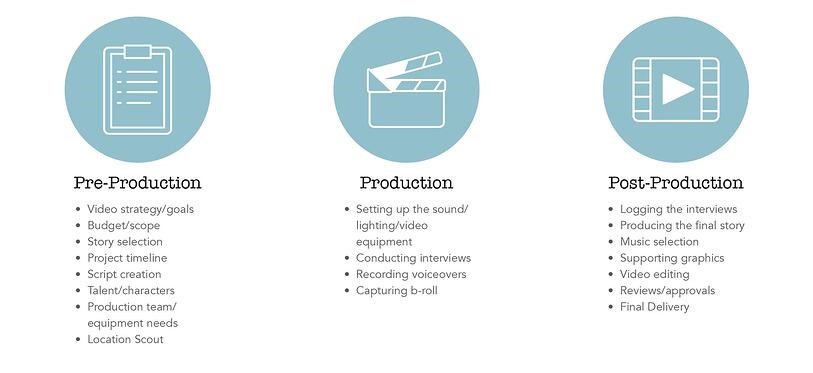
A well-organized pre-production checklist acts as a roadmap, ensuring that every critical element is addressed before the production phase begins. It serves as a vital tool for communication and accountability among the production team, minimizing oversights and maximizing efficiency.To ensure all elements are ready for production, a comprehensive pre-production checklist should encompass the following categories:
- Creative Elements: Finalized script, approved storyboard, shot list, character breakdowns, prop list, costume design.
- Logistical Elements: Secured filming permits, signed location agreements, confirmed cast and crew availability, transportation arrangements, catering and craft services plans, accommodation bookings (if applicable).
- Technical Elements: Confirmed equipment rentals, tested camera and audio gear, planned lighting setups, finalized visual effects (VFX) requirements, data management plan, backup power solutions.
- Legal and Administrative: Signed model releases, music and copyright clearances obtained, insurance certificates in order, emergency contact list compiled, production insurance details confirmed.
- Location Specifics: Finalized location scouting reports, confirmed access times and restrictions, identified on-site power sources, assessed potential sound interference, noted safety hazards and mitigation plans.
- Team Coordination: Finalized call sheets distributed, roles and responsibilities clearly defined for each team member, communication protocols established, emergency procedures reviewed.
Technical Rehearsals and Location Surveys
Conducting thorough technical rehearsals and detailed location surveys are indispensable steps that bridge the gap between planning and execution. These activities identify potential challenges and confirm the feasibility of the planned shots, ensuring that the production team is fully prepared to capture the intended vision effectively and efficiently.The importance of conducting technical rehearsals and location surveys can be elaborated as follows:
- Location Surveys: A detailed location survey involves visiting each filming site prior to the shoot to assess practicalities. This includes evaluating natural light conditions at different times of day, identifying potential noise sources that could affect audio recording, checking for available power outlets and their capacity, and determining the best positions for cameras and lighting. It also involves identifying any safety concerns and planning for their mitigation, such as securing hazardous areas or establishing clear pathways.
For instance, a survey for an outdoor scene might reveal that the wind direction changes significantly throughout the day, impacting audio capture and requiring specific wind-buffering techniques.
- Technical Rehearsals: Technical rehearsals are practice runs designed to test all technical aspects of the production in the actual filming environment. This includes rehearsing camera movements, testing lighting setups to ensure they achieve the desired look and mood, verifying audio recording levels and clarity with dialogue and ambient sounds, and practicing any complex visual effects or transitions. For a scene involving a complex camera dolly shot, a technical rehearsal would allow the crew to practice the movement, confirm its smoothness, and ensure it aligns with the storyboard and director’s vision without disrupting the actual filming schedule.
This proactive testing helps to iron out any technical glitches and optimize the workflow.
“Thorough preparation in pre-production is not merely about avoiding problems; it’s about maximizing creative potential.”
The Shooting Process
The shooting process is where your meticulously planned video production truly comes to life. This phase demands a delicate balance of creative direction, logistical efficiency, and technical precision to capture the essence of your project. It’s the moment of execution, translating storyboards and scripts into tangible visuals and audio.This section will guide you through the critical aspects of on-set operations, focusing on how to achieve optimal performances, maintain a streamlined workflow, and ensure the highest quality of captured footage and sound.
On-Set Direction Techniques
Effective direction on set is paramount to eliciting the desired performances from actors and ensuring the overall vision of the video is realized. This involves clear communication, building trust, and providing constructive feedback.
- Clear and Concise Communication: Provide actors with specific, actionable direction. Instead of saying “be more emotional,” guide them with phrases like “imagine you’ve just received this news and your world has changed.”
- Active Listening and Observation: Pay close attention to what your actors are bringing to the performance. Be open to their interpretations and suggestions, as they can often enhance the scene. Observe their body language and emotional cues to fine-tune their delivery.
- Building Rapport and Trust: Create a supportive and collaborative environment. Actors perform best when they feel safe and understood. Take the time to discuss the scene’s context and their character’s motivations.
- Positive Reinforcement and Constructive Criticism: Acknowledge and praise strong performances. When adjustments are needed, frame feedback constructively, focusing on the desired outcome rather than perceived flaws. For instance, “Let’s try that again, but this time, focus on conveying a sense of urgency in your voice.”
- Rehearsal and Repetition: While efficiency is key, adequate rehearsal time, even on set, can make a significant difference. Encourage actors to run lines and explore emotional beats before rolling.
- Visual Cues and Demonstrations: Sometimes, a visual demonstration of a movement or expression can be more effective than verbal instruction.
Managing a Smooth and Efficient Shooting Day
A well-managed shooting day minimizes wasted time and resources, ensuring that your team can capture all necessary footage within the planned schedule and budget. This requires proactive planning and adaptability.
- Adherence to the Schedule: Follow the call sheet meticulously, but be prepared for minor adjustments. Prioritize essential shots and scenes that are logistically dependent on each other.
- Efficient Setup and Breakdown: Have a clear plan for setting up and dismantling equipment between shots and scenes. Assign specific crew members to these tasks to ensure speed and accuracy.
- Clear Shot Lists and Scene Breakdown: Ensure everyone on set understands the specific shots required for each scene. A detailed shot list, often cross-referenced with the storyboard, is invaluable.
- Contingency Planning: Anticipate potential delays, such as weather issues, technical glitches, or unexpected creative needs. Have backup plans in place to mitigate their impact.
- Regular Communication and Check-ins: Maintain open lines of communication with all department heads. Regular brief check-ins can identify and resolve potential bottlenecks before they escalate.
- Maintaining Energy and Morale: Long shooting days can be draining. Encourage short breaks, provide adequate refreshments, and foster a positive, collaborative atmosphere to keep the team motivated.
- Time Management for Specific Shots: For complex shots, such as those involving special effects, intricate camera movements, or multiple actors, allocate specific time blocks and ensure all necessary personnel are briefed and ready.
Capturing High-Quality Footage and Audio
The technical quality of your footage and audio directly impacts the professional polish and viewer experience of your video. This involves careful attention to camera settings, lighting, and sound recording.
Footage Quality
Achieving high-quality footage involves understanding your camera’s capabilities and employing best practices for visual capture.
- Camera Settings: Ensure your camera is set to the appropriate resolution, frame rate, and aspect ratio for your project. Proper exposure is critical; aim for well-lit shots without blown-out highlights or crushed shadows. Utilize tools like zebras and histograms to monitor exposure accurately.
- Lighting Techniques: Effective lighting shapes the mood, depth, and clarity of your visuals. Understand the principles of three-point lighting (key, fill, and back light) and how to adapt them to different scenarios. Consider the use of natural light and supplementary artificial lights to create the desired aesthetic.
- Composition and Framing: Apply principles of visual composition, such as the rule of thirds, leading lines, and symmetry, to create visually appealing and engaging shots. Ensure consistent framing for dialogue scenes and maintain a clear subject focus.
- Camera Movement: Use camera movements intentionally to enhance storytelling. Smooth, deliberate movements like pans, tilts, and dollies can add dynamism, while static shots can create a sense of stability or tension.
- Focus Control: Maintain sharp focus on your subject. Utilize manual focus for critical shots or ensure your autofocus system is reliably tracking the intended subject.
Audio Quality
Clear, crisp audio is often more important than high-definition video for viewer engagement. Poor audio can quickly disengage an audience.
- Microphone Selection: Choose the right microphone for the situation. Shotgun microphones are excellent for isolating dialogue, while lavalier microphones are discreet and provide consistent audio for individuals. Condenser microphones are often used for ambient sound or music.
- Microphone Placement: Position microphones as close to the sound source as possible without being visible in the frame. For dialogue, aim for the microphone to be within 6-12 inches of the talent’s mouth.
- Monitoring Audio Levels: Continuously monitor audio levels during recording using headphones and the camera’s audio meters. Aim for levels that are strong but do not peak into distortion. A good target is typically around -12dB to -6dB.
- Minimizing Background Noise: Scout locations for potential noise sources (traffic, air conditioning, chatter) and take steps to mitigate them. This might involve turning off noisy equipment, using sound-dampening materials, or scheduling shooting during quieter times.
- Room Tone Recording: Always record at least 30 seconds of “room tone” (the ambient sound of the location with no dialogue) at the beginning and end of each scene. This is crucial for seamless audio editing later.
- Backup Audio Recording: Consider using a secondary audio recording device as a backup to ensure you never lose critical dialogue.
Post-Production Workflow: Editing and Sound Design
The post-production phase is where your raw footage transforms into a polished and compelling video. This critical stage involves meticulously assembling your shots, refining the narrative flow, and enhancing the overall aesthetic through precise editing and sophisticated sound design. It’s a process that requires patience, attention to detail, and a clear understanding of your project’s goals.This section will guide you through the essential steps of post-production, from the initial assembly of your footage to the final mixing of audio elements, ensuring your video resonates with your intended audience and achieves its objectives.
Video Editing Stages
Video editing is a multi-stage process that builds upon itself, starting with organizing footage and progressing to intricate adjustments that define the final look and feel of your video. Each stage is vital for creating a cohesive and engaging viewing experience.The typical workflow involves the following key phases:
- Assembly Edit: This initial stage involves bringing all your selected clips into the editing timeline in the rough order of your script or storyboard. The focus is on getting the basic sequence of events down without much concern for pacing or precise timing. It’s about building the foundation of your narrative.
- Rough Cut: Once the assembly is complete, the rough cut refines the sequence. Here, you’ll start trimming clips, adjusting transitions, and ensuring the story flows logically from one scene to the next. The goal is to establish the overall rhythm and structure of the video.
- Fine Cut: This is where the editing becomes more detailed. You’ll meticulously refine the timing of each shot, enhance pacing, and ensure smooth transitions. This stage also involves adding visual effects, graphics, and ensuring that the emotional arc of the video is effectively conveyed.
- Picture Lock: This is a crucial milestone where the visual edit is finalized and approved. No further changes to the timing or sequence of the video are made at this point, allowing the sound and color teams to work with a stable picture.
- Color Correction and Grading: Color correction involves adjusting the exposure, contrast, and white balance of your footage to ensure consistency across all shots. Color grading then takes this a step further, applying creative color palettes and styles to enhance the mood and aesthetic of the video, making it visually appealing and reinforcing the narrative’s tone.
Sound Design and Mixing
Sound is often considered the unsung hero of video production, playing an equally important role as visuals in shaping audience perception and emotional engagement. Effective sound design and mixing can elevate a good video to a great one, immersing viewers in the story and reinforcing its message.The comprehensive approach to sound in post-production includes:
- Dialogue Editing: This involves cleaning up recorded dialogue, removing background noise, and ensuring clarity and intelligibility. Proper equalization and compression are applied to make dialogue sound natural and consistent.
- Sound Effects (SFX) Design: This encompasses adding or enhancing sounds that are not dialogue or music. This can include everything from subtle ambient sounds that establish a location to impactful Foley effects that enhance actions on screen. For example, the crunch of footsteps on gravel or the distant hum of traffic can significantly increase realism.
- Music Integration: Selecting and placing background music is crucial for setting the mood and emotional tone of different scenes. Music can guide the audience’s feelings, build tension, or provide moments of reflection.
- Sound Mixing: This is the process of balancing all the audio elements – dialogue, sound effects, and music – to create a cohesive and professional-sounding track. Levels are adjusted, and effects like reverb or delay are applied to create a sense of space and depth. A well-mixed track ensures that no single element overpowers another and that the overall audio experience is pleasing and impactful.
“Sound is half the picture.”
George Lucas
This quote highlights the profound impact that audio has on the perceived quality and effectiveness of a visual medium.
Organizing the Post-Production Workflow
An organized workflow is paramount for efficient and effective post-production. Establishing a clear process minimizes errors, saves time, and ensures all aspects of the editing and sound design are addressed systematically.A structured workflow can be implemented as follows:
- Project Setup and Organization: Create a well-defined folder structure for all your project assets (footage, audio files, graphics, project files). This prevents confusion and makes it easy to locate specific elements.
- Ingest and Transcode Footage: Import all your raw footage into your editing software and transcode it into a more manageable format if necessary, ensuring smooth playback and editing.
- Assembly and Rough Cut: Follow the editing stages as Artikeld above, focusing on narrative flow and pacing.
- Sound Editing and Design: Begin cleaning up dialogue, adding sound effects, and integrating music. This can often happen concurrently with the fine-tuning of the edit.
- Picture Lock and Sound Mixing: Once the picture is locked, dedicate focused time to the final sound mix, ensuring all audio elements are balanced and polished.
- Color Correction and Grading: Apply color adjustments to achieve the desired look and feel of the video.
- Review and Feedback: Share drafts with stakeholders for feedback and make necessary revisions. This is a critical loop to ensure the final product meets expectations.
- Final Export: Render the final video in the required formats and resolutions for distribution.
Finalizing and Exporting the Video
The final stages of video production involve refining the visual and auditory elements to their highest potential and preparing the video for its intended distribution channels. This phase is crucial for delivering a polished and professional final product that resonates with your audience and meets technical specifications.Color grading and audio mastering are the critical finishing touches that elevate your video from raw footage to a compelling narrative.
Color grading involves adjusting the color and tone of your footage to create a specific mood, enhance visual appeal, and ensure consistency across all shots. Audio mastering focuses on balancing sound levels, reducing noise, and optimizing the overall audio quality for clarity and impact.
Color Grading Process
Color grading is an art and a science that transforms the emotional feel and visual consistency of your video. It involves a series of adjustments to hue, saturation, and luminance to achieve a desired aesthetic. This process can range from subtle enhancements to dramatic stylistic transformations.The typical color grading workflow involves several steps:
- Correction: This initial step addresses basic imbalances in exposure, white balance, and contrast to ensure all shots are technically sound and visually consistent.
- Grading: This is where the creative decisions are made. Adjustments are applied to create a specific mood or style, such as warm and inviting tones for a lifestyle video, or cool and desaturated colors for a dramatic thriller.
- Stylization: This phase involves applying creative looks or filters to further enhance the aesthetic. This could include emulating film stocks, creating a vintage feel, or developing a unique visual signature for the brand or project.
Professionals often use specialized software like DaVinci Resolve, Adobe Premiere Pro’s Lumetri Color panel, or Final Cut Pro X for these tasks, utilizing tools like scopes (waveforms, vectorscopes, histograms) to guide their decisions and ensure accuracy.
Audio Mastering
Audio mastering is the final step in the sound post-production process, ensuring your video’s audio is clear, balanced, and professionally presented across all playback systems. It involves a suite of technical and creative adjustments to the mixed audio.Key aspects of audio mastering include:
- Level Balancing: Ensuring dialogue, music, and sound effects are at appropriate and consistent volume levels, preventing any single element from overpowering others.
- Dynamic Range Control: Utilizing compressors and limiters to manage the difference between the loudest and quietest parts of the audio, making it more impactful and easier to listen to on various devices.
- Noise Reduction: Identifying and removing unwanted background noise, hums, or clicks that may have been captured during production.
- EQ Adjustments: Fine-tuning the frequency spectrum to enhance clarity, warmth, or presence of different audio elements.
- Loudness Normalization: Adhering to industry standards for loudness (e.g., LUFS – Loudness Units Full Scale) to ensure a consistent listening experience across different platforms.
This process is vital for creating a professional and engaging auditory experience that complements the visuals.
Video Export Formats and Their Uses
Selecting the correct video export format is paramount for ensuring your video plays correctly and looks its best on its intended platform. Different formats are optimized for various uses, from web streaming to broadcast television.Here’s a breakdown of common export formats and their applications:
- H.264 (MP4): This is the most widely used codec for web video and general distribution due to its excellent balance of quality and file size. It’s ideal for platforms like YouTube, Vimeo, social media, and online courses.
- H.265 (HEVC): A more efficient successor to H.264, offering similar quality at a smaller file size, making it suitable for 4K content and streaming where bandwidth is a concern.
- ProRes (MOV): A high-quality, professional codec often used for editing and post-production, especially on macOS. It offers less compression than H.264/H.265, preserving more image data for further manipulation, and is suitable for broadcast or archival purposes.
- DNxHD/DNxHR (MXF or MOV): Avid’s professional editing codecs, similar in purpose to ProRes, offering high quality and excellent for post-production workflows, particularly in professional broadcast environments.
- WebM: An open-source format often used for web streaming, particularly by Google platforms. It offers good compression and quality for online delivery.
The choice of format also depends on the target resolution (e.g., 1080p, 4K), frame rate (e.g., 24fps, 30fps, 60fps), and the specific requirements of the distribution platform.
Final Review and Quality Assurance Checklist
Before distributing your video, a thorough final review and quality assurance process is essential to catch any errors and ensure a polished final product. This checklist covers critical aspects of both technical and content quality.Before proceeding with distribution, ensure the following points have been addressed:
- Content Accuracy: All information presented in the video is correct and up-to-date.
- Narrative Flow: The story or message is clear, logical, and engaging from beginning to end.
- Visual Consistency: Colors, lighting, and framing are consistent across all shots.
- Audio Clarity: Dialogue is clear, music levels are appropriate, and sound effects are well-placed and not distracting.
- Technical Glitches: No visual artifacts, dropped frames, audio pops, or other technical errors are present.
- Text and Graphics: All on-screen text, lower thirds, and graphics are spelled correctly, accurately placed, and legible.
- Branding Elements: Logos, brand colors, and other branding elements are correctly implemented.
- Call to Action: Any intended calls to action are clear and correctly displayed.
- Format and Resolution: The video is exported in the correct format, resolution, and frame rate for the intended platform.
- File Naming Convention: The final file is named according to established project conventions for easy identification and archiving.
A diligent review at this stage can prevent costly mistakes and ensure your video makes the best possible impression.
Last Word
In conclusion, mastering the art of video production planning is paramount to achieving your creative and communicative goals. By diligently following the Artikeld phases, from the initial concept to the final export, you empower yourself to produce high-quality content that effectively engages your audience and fulfills your project’s objectives. Embrace this structured approach to unlock your full production potential.